Showing posts sorted by date for query photomerge. Sort by relevance Show all posts

Friday, January 06, 2017

Photomerge Assignment Overview


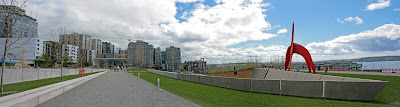
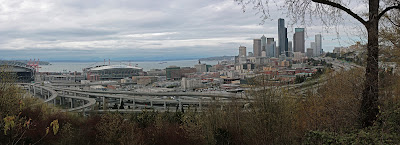
Your assignment over the next week is to take multiple  panorama style photomerges.  Take a picture and then move the camera slightly up or sideways to take another "connected" image. Basically you combine smaller pictures to make one larger picture.

Use a tripod if possible. Remember to manual adjust white balance or select something like "cloudy" or "sunny" on your camera.

Here is how you connect multiple pictures in Photoshop.

To set up a new Photomerge composition:
Import Photos
Place pictures in a separate folder for each merge
Do one of the following:
Choose File > Automate > Photomerge.
In the File Browser, select the images you want to use and then choose Automate > Photomerge from the File Browser menu bar
In the dialog box, choose an option from the Use pop-up menu:
  • Files to generate the Photomerge composition using individual files.
  • Folders to use all the images stored in a folder to create the Photomerge composition. The files in the folder appear in the dialog box.
  • Open Files to use the image files you have open in Photoshop.
Click the Browse button to navigate to the source files or folder you want to use to create the Photomerge composition. Select Attempt to Automatically Arrange Source Images if you want Photoshop to try to line the images up in their proper order.
Then edit your picture as you need.

Here is a tutorial you can use to get you going.
http://www.youtube.com/watch?v=qrNI-gAuI5s 

Tentative schedule

Monday January 8: Practice at school up by the track,the front of the school or Hamlin. Take seven different photomerges comprised of 3-9 pictures each. Turn in Photomerge Practice Contact Sheet.
Merge your pictures in Photoshop using the directions above.
Wednesday January 13: All period off-campus shooting day. Pick an amazing location and shoot seven photo merges consisting of 3-9 pictures each. Turn in Photomerge CS1. These pictures will not be merged together.
Friday January 15: Photomerge editing.
Weekend Homework: Go to one landscape location and shoot seven different photo merges consisting of 3-9 pictures each. Turn in Photomerge CS2. These pictures will not be merged together.
Wednesday January 18: All period off-campus shooting day. Pick an amazing location and shoot seven photo merges consisting of 3-9 pictures each. Turn in Photomerge CS3. These pictures will not be merged together.


Wednesday, January 13, 2016

Photomerge Assignment

Photomerge Assignment


Your assignment over the next week is to take multiple  panorama style photomerges.  Take a picture and then move the camera slightly up or sideways to take another "connected" image. Basically you combine smaller pictures to make one larger picture.

Use a tripod if possible. Remember to manual adjust white balance or select something like "cloudy" or "sunny" on your camera.

Here is how you connect multiple pictures in Photoshop.

To set up a new Photomerge composition:
Import Photos
Place pictures in a separate folder for each merge
Do one of the following:
Choose File > Automate > Photomerge.
In the File Browser, select the images you want to use and then choose Automate > Photomerge from the File Browser menu bar
In the dialog box, choose an option from the Use pop-up menu:
  • Files to generate the Photomerge composition using individual files.
  • Folders to use all the images stored in a folder to create the Photomerge composition. The files in the folder appear in the dialog box.
  • Open Files to use the image files you have open in Photoshop.
Click the Browse button to navigate to the source files or folder you want to use to create the Photomerge composition. Select Attempt to Automatically Arrange Source Images if you want Photoshop to try to line the images up in their proper order.
Then edit your picture as you need.

Here is a tutorial you can use to get you going.
http://www.youtube.com/watch?v=qrNI-gAuI5s 

Tentative schedule

Wednesday January 13: Practice at school up by the track,the front of the school or Hamlin. Take seven different photomerges comprised of 3-9 pictures each. Turn in Photomerge Practice Contact Sheet.
Merge your pictures in Photoshop using the directions above.
Friday January 15: All period off-campus shooting day. Pick an amazing location and shoot seven photo merges consisting of 3-9 pictures each. Turn in Photomerge CS1. These pictures will not be merged together.
Weekend Homework: Go to one landscape location and shoot seven different photo merges consisting of 3-9 pictures each. Turn in Photomerge CS2. These pictures will not be merged together.
Wednesday January 20: All period off-campus shooting day. Pick an amazing location and shoot seven photo merges consisting of 3-9 pictures each. Turn in Photomerge CS3. These pictures will not be merged together.
Friday January 22: Photomerge editing.


Tuesday, February 03, 2015

Types of photos for Magazine Assingnment


Landscape
Silhouette
Macro:
Motion
Moving People
Portrait
Food/restaurants
Architecture/buildings
Abstract
HDR
Shutter
Panning
Photomerge

How do each of your photos encourage people to visit Shoreline? What makes each picture unique and special?

Tuesday, January 20, 2015

Final Photography Assignments Due Thursday


Photography due on Thursday

Best Photomerge Final Photo as a jpeg
8 Photomerge Adjusted Contact Sheet as a jpeg

Three pictures of your choice for printing named:
  • Final Printing 1
  • Final Printing 2
  • Final Printing 3

Friday, January 16, 2015

Photomerge Contact Sheets Due So Far


·Photomerge Homework CS1
·Photomerge Classwork CS1

16-24 un-merged pictures per sheet

Thursday, January 08, 2015

Photomerge Assignment


Your assignment over the next week is to take multiple  panorama style photomerges.  Take a picture and then move the camera slightly up or sideways to take another "connected" image. Basically you combine smaller pictures to make one larger picture.

Use a tripod if possible. Remember to manual adjust white balance or select something like "cloudy" or "sunny" on your camera.

Here is how you connect multiple pictures in Photoshop.

To set up a new Photomerge composition:
Do one of the following:
Choose File > Automate > Photomerge.
In the File Browser, select the images you want to use and then choose Automate > Photomerge from the File Browser menu bar
In the dialog box, choose an option from the Use pop-up menu:
  • Files to generate the Photomerge composition using individual files.
  • Folders to use all the images stored in a folder to create the Photomerge composition. The files in the folder appear in the dialog box.
  • Open Files to use the image files you have open in Photoshop.
Click the Browse button to navigate to the source files or folder you want to use to create the Photomerge composition. Select Attempt to Automatically Arrange Source Images if you want Photoshop to try to line the images up in their proper order.
Then edit your picture as you need.

Here is a tutorial you can use to get you going.
http://www.youtube.com/watch?v=qrNI-gAuI5s

Tentative schedule

Thursday/Friday: Practice at school up by the track,the front of the school or Hamlin. Take five different photomerges comprised of 3-5 pictures each.
Return to class at 11:45.
Merge your pictures in Photoshop using the directions above.

Weekend Homework: Go to one landscape location and shoot five different photomerges. This means you will shoot about 15-20 pictures
Monday/Tuesday: Off campus shooting
Wednesday/Thursday: editing


Thursday, May 01, 2014

Photomerge and Sequence Projects to turn in


Due Thursday May 1:

·   Three adjusted Photomerges from three different locations (one from Golden Hour) on one Contact Sheet called “Photomerge Adjusted.”
·   One Sequence adjusted as a .jpeg called “Sequence Adjusted.”
·   Your best Photomerge or Sequence adjusted for printing called “__________ for print.”

Sunday, April 27, 2014

Digital Photo 1 4/28

  • Import your photos.
  • Create a Contact Sheet called Spring Break. Include pictures from all three Photomerge locations (pick the best ones) and your sequence shots.
  • Turn your Contact Sheet in to the Staff Server.
  • Start merging your Photomerge pictures. Save these but do not turn them in.
  • Do not merge your sequences until Tuesday.

Thursday, April 17, 2014

Spring Break Homework

Good morning,

Here is the spring break homework for Digital Photography. Details can be found below in the Photomerege and Sequence examples below.


Over spring break you need to shoot three successful and awesome looking landscape Photomerges in three separate locations. One must shot be during golden hour. Shoot both vertically and horizontally. Each Photomerge should be at least 3-5 pictures. I would recommend attempting at least four or five different merges at each location.

Also, shoot one intense action sequence merge. Take at least 3-5 pictures in the sequence. Please make sure the subject is in focus and the lighting is desirable.

Tuesday, April 15, 2014

Photomerge Assignment


One of your assignments over Spring Break multiple landscape panorama style photomerges.  Take a picture and then move the camera slightly up or sideways to take another "connected" image. Basically you combine smaller pictures to make one larger picture.

Use a tripod if possible. Remember to manual adjust white balance or select something like "cloudy" or "sunny" on your camera.


Here is how you connect multiple pictures in Photoshop.

  • Import your pictures using Image Capture
  • Create separate folders on your computer for each Photomerge and move the pictures into this folder

To set up a new Photomerge composition:
Do one of the following:
Choose File > Automate > Photomerge.
In the File Browser, select the images you want to use and then choose Automate > Photomerge from the File Browser menu bar
In the dialog box, choose an option from the Use pop-up menu:
  • Files to generate the Photomerge composition using individual files.
  • Folders to use all the images stored in a folder to create the Photomerge composition. The files in the folder appear in the dialog box.
  • Open Files to use the image files you have open in Photoshop.
Click the Browse button to navigate to the source files or folder you want to use to create the Photomerge composition. Select Attempt to Automatically Arrange Source Images if you want Photoshop to try to line the images up in their proper order.
Then edit your picture as you need.

Here is a tutorial you can use to get you going.
http://www.youtube.com/watch?v=qrNI-gAuI5s


Thursday, December 19, 2013

Final Project Treatment

This Treatment is due by Friday December 20th.

1. What is your theme for your final project?Example: My theme project is Old America, Photomerge Seattle, or Man v. Nature.
2. Why did you choose this as your theme? What is interesting about this theme? Be specific. 2-3 sentences
3. What type of locations will you choose to shoot your pictures? Why? Keep in mind that you will need to leave campus and most likely leave Shoreline. Please give three or four examples.
4. What type of pictures do you hope to take? Action, portrait, landscape etc? A good photo essay will have a variety. Give me some specific examples and how they relate to your theme. Yes, I want you to attempt to describe pictures you haven't even taken yet. Visualize...
5. What kind of composition will you focus on in your pictures? You will need at least five composition elements (not counting rule-of-thirds). Yes, again I want to know what you are attempting before you shoot. What will you try that you haven't done before?
5b. How will your pictures convey emotion, either from your subject or from the viewer of the pictures? Why will an audience really enjoy these pictures?
6. How much work will be done at school and how much away from school?
7. If you don't have a car, how will you make sure you get to your locations? Can your parents help? How about public transit?
8. This project should showcase everything you have learned in Digital Photography. How will you ensure this happens? What Photoshop adjustment techniques will you use? Please give three or four examples.
9. Is there anything you are unclear about in terms of composition or shot styles and angles etc? This is the time to ask.
10. What type of camera or Photoshop experimentation will you try? HDR? Photomerge pictures? Aperture adjustments? Shutter Speed work?

Again, Send the treatment to my email account. Please CC at least one of your parents or guardians on the email so they know they extent of this project. They may need to help with transportation etc.

Wednesday, November 13, 2013

Turning in Your Photomerge Pictures

Today you will turn in Photomerge CS3.
You will then merge all of your new pictures.
Next you will edit all of your merged pictures in Photoshop.

At 11:15 you will turn in your best five Photomerges on a Contact Sheet. This Contact Sheet must contain at least one picture from each day of shooting.
You will also turn in your best Photomerge for grading. I will discuss printing the Photomerges in class.

Photomerge Grading:
1. Photomerege needs to look like one picture. Colors and objects in pictures should blend together perfectly without any errors.
2. Photomerege should showcase rule of thirds and foreground, mind-ground, and background subjects just like a landscape photo.
3. Photomerge should showcase an interesting location. Picture should look like something you would see in a calendar or framed on a wall.

Thursday, October 31, 2013

Photomerge Assignment


Your assignment over the next five to six days is to take multiple landscape panorama style photomerges.  Take a picture and then move the camera slightly up or sideways to take another "connected" image. Basically you combine smaller pictures to make one larger picture.

Use a tripod if possible. Remember to manual adjust white balance or select something like "cloudy" or "sunny" on your camera.


Here is how you connect multiple pictures in Photoshop.

To set up a new Photomerge composition:
Do one of the following:
Choose File > Automate > Photomerge.
In the File Browser, select the images you want to use and then choose Automate > Photomerge from the File Browser menu bar
In the dialog box, choose an option from the Use pop-up menu:
  • Files to generate the Photomerge composition using individual files.
  • Folders to use all the images stored in a folder to create the Photomerge composition. The files in the folder appear in the dialog box.
  • Open Files to use the image files you have open in Photoshop.
Click the Browse button to navigate to the source files or folder you want to use to create the Photomerge composition. Select Attempt to Automatically Arrange Source Images if you want Photoshop to try to line the images up in their proper order.
Then edit your picture as you need.

Here is a tutorial you can use to get you going.
http://www.youtube.com/watch?v=qrNI-gAuI5s


Tentative schedule

Friday: Practice at school up by the track,the front of the school or Hamlin. Take five different photomerges comprised of 3-5 pictures each.
Return to class at 11:30.
Merge your pictures in Photoshop using the directions above.

Weekend Homework: Go to one landscape location and shoot five different photomerges. This means you will shoot about 15-20 pictures
Monday: editing
Wednesday: shooting day, go to an AWESOME landscape location to take more pictures


Tuesday, May 21, 2013

Photo 1 Final Project Treatment

1. What is your theme for your final project?Example: My theme project is Old America, Photomerge Seattle, or Man v. Nature.
2. Why did you choose this as your theme? What is interesting about this theme? Be specific. 2-3 sentences
3. What type of locations will you choose to shoot your pictures? Why? Keep in mind that you will need to leave campus and most likely leave Shoreline. Please give three or four examples.
4. What type of pictures do you hope to take? Action, portrait, landscape etc? A good photo essay will have a variety. Give me some specific examples and how they relate to your theme. Yes, I want you to attempt to describe pictures you haven't even taken yet. Visualize...
5a. What kind of composition will you focus on in your pictures? You will need at least five composition elements (not counting rule-of-thirds). Yes, again I want to know what you are attempting before you shoot. What will you try that you haven't done before?
5b. How will your pictures convey emotion, either from your subject or from the viewer of the pictures? Why will an audience really enjoy these pictures?
6. How much work will be done at school and how much away from school?
7. If you don't have a car, how will you make sure you get to your locations? Can your parents help? How about public transit?
8. This project should showcase everything you have learned in Digital Photography. How will you ensure this happens? What Photoshop adjustment techniques will you use? Please give three or four examples.
9. Is there anything you are unclear about in terms of composition or shot styles and angles etc? This is the time to ask.
10. What type of camera or Photoshop experimentation will you try? HDR? Photomerge pictures? Aperture adjustments? Shutter Speed work?
 
Send the treatment to my email account. Please CC at least one of your parents or guardians on the email so they know they extent of this project. They may need to help with transportation etc.

Tuesday, January 08, 2013

Final Project Treatment

This Treatment is due by Wednesday the 8th (not Thursday the 9th).

1. What is your theme for your final project?Example: My theme project is Old America, Photomerge Seattle, or Man v. Nature.
2. Why did you choose this as your theme? What is interesting about this theme? Be specific. 2-3 sentences
3. What type of locations will you choose to shoot your pictures? Why? Keep in mind that you will need to leave campus and most likely leave Shoreline. Please give three or four examples.
4. What type of pictures do you hope to take? Action, portrait, landscape etc? A good photo essay will have a variety. Give me some specific examples and how they relate to your theme. Yes, I want you to attempt to describe pictures you haven't even taken yet. Visualize...
5. What kind of composition will you focus on in your pictures? You will need at least five composition elements (not counting rule-of-thirds). Yes, again I want to know what you are attempting before you shoot. What will you try that you haven't done before?
5b. How will your pictures convey emotion, either from your subject or from the viewer of the pictures? Why will an audience really enjoy these pictures?
6. How much work will be done at school and how much away from school?
7. If you don't have a car, how will you make sure you get to your locations? Can your parents help? How about public transit?
8. This project should showcase everything you have learned in Digital Photography. How will you ensure this happens? What Photoshop adjustment techniques will you use? Please give three or four examples.
9. Is there anything you are unclear about in terms of composition or shot styles and angles etc? This is the time to ask.
10. What type of camera or Photoshop experimentation will you try? HDR? Photomerge pictures? Aperture adjustments? Shutter Speed work?

Again, Send the treatment to my email account. Please CC at least one of your parents or guardians on the email so they know they extent of this project. They may need to help with transportation etc.

Thursday, November 01, 2012

Photomerge Assignment


Your assignment over the next five to six days:

You will create three Photomerge pictures. These are 3-5 pictures that overlap to show a wide landscape or cityscape
Your three Landscape/Cityscape style Photomerges should be taken at two different locations at two different times of day.

Use a tripod if possible. Remember to manual adjust white balance or select something like "cloudy" or "sunny" on your camera.

Summary
  • Three locations
  • One Photomerge from each location
  • make sure each Photomerge is taken at a different time

Tentative schedule

Tuesday: shooting day, go to an AWESOME landscape location leave at the end of Ti2
Thursday: shooting day, go to an AWESOME landscape location, leave at TAP
Weekend: At least one more location

Note: I would shoot at least eight or nine Photomerges from each location. Shoot each attempt at a slightly different angle. Again, and I can't emphasize this enough, a tripod really helps.


Monday, January 09, 2012

Photo: Final Project Treatment


Turn in this Treatment to the STAFF server AND email it to me and your parents.

1. What is your theme for your final project?Example: My theme project is Old America, Photomerge Seattle, or Man v. Nature.
2. Why did you choose this as your theme? What is interesting about this theme? Be specific. 2-3 sentences
3. What type of locations will you choose to shoot your pictures? Why? Keep in mind that you will need to leave campus and most likely leave Shoreline. Please give three or four examples.
4. What type of pictures do you hope to take? Action, portrait, landscape etc? A good photo essay will have a variety. Give me some specific examples and how they relate to your theme. Yes, I want you to attempt to describe pictures you haven't even taken yet. Visualize...
5. What kind of composition will you focus on in your pictures? You will need at least five composition elements (not counting rule-of-thirds). Yes, again I want to know what you are attempting before you shoot. What will you try that you haven't done before?
5b. How will your pictures convey emotion, either from your subject or from the viewer of the pictures? Why will an audience really enjoy these pictures?
6. How much work will be done at school and how much away from school?
7. If you don't have a car, how will you make sure you get to your locations? Can your parents help? How about public transit?
8. This project should showcase everything you have learned in Digital Photography. How will you ensure this happens? What Photoshop adjustment techniques will you use? Please give three or four examples.
9. Is there anything you are unclear about in terms of composition or shot styles and angles etc? This is the time to ask.
10. What type of camera or Photoshop experimentation will you try? HDR? Photomerge pictures? Aperture adjustments? Shutter Speed work?

Please Answer these questions in detail(compete sentences)and send these questions to my staff folder, period 5.
Next, please copy these questions to your email. Send the treatment to my email account. Please CC at least one of your parents or guardians on the email so they know they extent of this project. They may need to help with transportation etc.

Wednesday, November 09, 2011

Photomerge Static


Your assignment over the next five to six days:

You will shoot Photomerge. These are 3-5 pictures that overlap to show a wide landscape or cityscape.
Your three  Landscape style Photomerges should be taken at three different locations preferably at different different times of day.

Use a tripod if possible. Remember to manually adjust the white balance or select something like "cloudy" or "sunny" on your camera.

Summary
  • Three locations
  • One Photomerge from each location
  • make sure each Photomerge is taken at a different time
All three locations are due next Monday.


Tuesday, January 04, 2011

Photo Essay Treatment

Turn in your Treatment to the STAFF server.

1. What is your theme for your final project?Example: My theme project is Old America, Photomerge Seattle, or Man v. Nature.
2. Why did you choose this as your theme? What is interesting about this theme? Be specific. 2-3 sentences
3. What type of locations will you choose to shoot your pictures? Why? Keep in mind that you will need to leave campus and most likely leave Shoreline. Please give three or four examples.
4. What type of pictures do you hope to take? Action, portrait, landscape etc? A good photo essay will have a variety. Give me some specific examples and how they relate to your theme. Yes, I want you to attempt to describe pictures you haven't even taken yet. Visualize...
5. What kind of composition will you focus on in your pictures? You will need at least five composition elements (not counting rule-of-thirds). Yes, again I want to know what you are attempting before you shoot. What will you try that you haven't done before?
5b. How will your pictures convey emotion, either from your subject or from the viewer of the pictures? Why will an audience really enjoy these pictures?
6. How much work will be done at school and how much away from school?
7. If you don't have a car, how will you make sure you get to your locations? Can your parents help? How about public transit?
8. This project should showcase everything you have learned in Digital Photography. How will you ensure this happens? What Photoshop adjustment techniques will you use? Please give three or four examples.
9. Is there anything you are unclear about in terms of composition or shot styles and angles etc? This is the time to ask.
10. What type of camera or Photoshop experimentation will you try? HDR? Photomerge pictures? Aperture adjustments?

Please Answer these questions in detail(compete sentences)and send these questions to my staff folder, period 3 and 5 (pick your class).
Next, please copy these questions to your email. Send the treatment to my email account. Please CC at least one of your parents or guardians on the email so they know they extent of this project. They may need to help with transportation.