Thursday, November 13, 2014

Abstract and Macro Homework

Period 3


Homework: One Abstract Contact Sheet due next Monday and one Macro Contact Sheet due Friday the 21st

Period 4


Homework: One Abstract Contact Sheet due next Tuesday and one Macro Contact Sheet due Monday the 25th.

Tuesday, October 28, 2014

Action Photo Editing

Please select your twenty best action photos.
These pictures should show faces, be 95% in focus, fill the frame, and showcase interesting angles and composition.
Crop, adjust, and color correct all pictures as needed. Only keep what is essential to the picture.

Edit four pictures into Grayscale.
Edit two pictures using Selective Focus.
Edit two picture using one-item kept in color.
Edit the other 12 pictures in what ever manner you see fit.

When you are done editing you will turn in the following:
  • Best Action Photos Adjusted CS
  • Best Shorecrest Action Picture as a jpeg.
  • Best Action Picture2 (your choice of subject) as a jpeg

Thursday, October 23, 2014

Photo 1 Action Photo Home work Schedule

-->

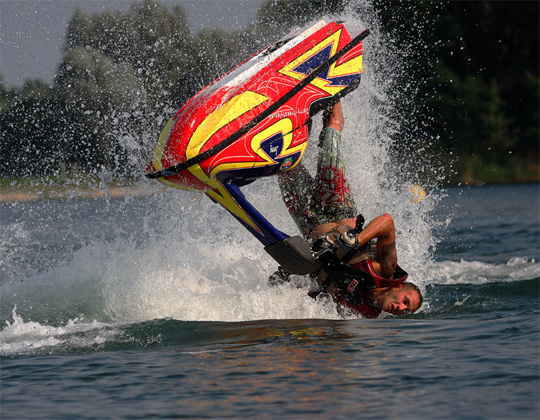
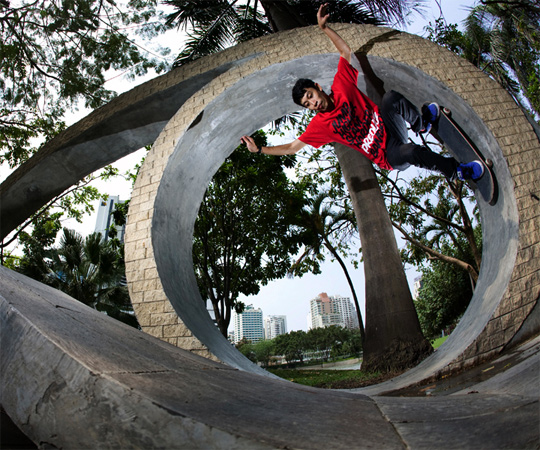
Here is a link to some great action photos. Please notice how most of these photos show engaging action in an interesting location. You will shoot similar photos during our Action Photo unit.

You will shoot action photos at two locations over the next ten days. One of these photo shoots must take place at a Shorecrest related event or sport. For example, you could take pictures of the Hip Hop, Football, Soccer, or Flag teams. The other location can be a place of your choice. Skateboarding, horseback riding, and dancing are all acceptable activities.

Due dates
Period 4
 Contact Sheet 1: October 28
Contact Sheet 2: November 4th

Period 3

Contact Sheet 1: October 31
Contact Sheet 2: November 3rd

action photographyaction photography

Monday, October 20, 2014

Photo 1: Panning

The panning shutter technique keeps your main subject in focus and blurs everything else in the picture.
Please read this helpful explanation and take notes.
Please watch this video to help reinforce your reading.

This video will help explain the process. It takes a great deal of practice in order to master this skill.

Sunday, October 12, 2014

Photo 1: Manual Camera Work

Manual Adjustments:Aperture and Shutter Speed

Please watch and take notes on both videos below:
Manual Settings Video
Manual Settings Video 2

Manual Adjustments:Aperture and Shutter Speed

http://cybercollege.com/tvp012.htm
http://www.picturecorrect.com/photographytips/208/aperture_fstops_camera_settings.htm

F-Stops and Shutter Speed Hints

Please take detailed notes in your own words on the top two reading assignment. You will using the material you learn this week on the cameras. Use the cameras simulators below when you are done.

Camera simulator:
http://www.photonhead.com/simcam/shutteraperture.php

http://www.kamerasimulator.se/eng/?page_id=2

http://dryreading.com/camera/index.html

htthttp://camerasim.com/camera-simulator/

Turning in Grayscale Work Photo 1

Please turn in the following items of work after 45 minutes of class:

One 24 Picture "Grayscale Adjusted Contact Sheet" with a variety of subjects adjusted in a variety of the Photoshop grayscale adjustment methods. Please make sure the adjustment method is named in the jpeg picture before you create the contact sheet.
Again, the Contact Sheet is called "Grayscale Adjusted Contact Sheet.'

When you are finished please look at the blog listing above to begin watching the Manual Camera work videos and then begin the reading. Take detailed notes please. We will have our first detailed note check on Wednesday.

Thursday, October 09, 2014

Next AP Photo Assignment

Homework

Visit the following website HERE to review a short article on Color Harmony as it exists in Complimentary and Analogous color schemes.  Type out these definitions in your own words on your computer.
Project
Select only four themes from the list below and photograph in color—THINK IN COLOR
Take 5 solid examples of each of those photos.  You will have total of 20 photos completed for this assignment.
1.            Reflections in chrome or other reflective surface           
2.            Reflections in water
3.            Store window reflections (e.g., an antique or consignment store)
4.            Light through a window
5.            Motorcycle close-up or car engine close-up
6.            Architectural detail
7.            Dual portraits of your friends
8.            Lines and patterns
9.            Foreshortened image
10.          Close-up of texture
11.          Silhouette
12.          Motion/Panning
13.          Perspective
Create a contact sheet and make sure to include which 4 themes you chose for this assignment anywhere in the negative space on the contact sheet.  Save it as a JPEG and name it _color.
Turn in 1 photo for printing and name it _print2 

These are due at the end of class on Monday, October 21st, 2014.


Your grade for this assignment will be based on several factors:
  • Completion of each image turned in on a contact sheet.
  • Turned in on time (formative)
  • The quality and creativity of your 20 best images
  • Your choice of which photos to possibly use for your portfolio (summative).

Tuesday, September 30, 2014

Digital Photo 1: Grayscale: Pattern and Shadow Assignment


Black and White Photo Tips 1
Tips 2
Tips 3


Your assignment over the next two weeks is to shoot:
  •  24 pictures involving man-made shadows
  •  24 other images involving lightness/darkness relationships with a focus on patterns 
  • 24 pictures with natural light (sun and moon) shadows


  • We will have a Pattern shooting days October 2 and 3.
  • A  shadows homework Contact Sheet is due October 7 and 8
  • An in-class shooting day for shadows will occur October 9 and 10.

Wednesday, September 24, 2014

Landscape Adjustments

Update: Here is what is due to finish the Landscape Unit
1. 15 Photoshop Adjusted Landscapes from three various locations. Call this "Landscape Adjusted."
2. Your best Landscape as a .jpeg file. Call this "Best Landscape."
Always use the naming convention. Example: 3_Mitchellt_Landscape Adjusted

Today you have the entire period to edit Landscape photos in Photoshop.
First, pick your best 15 landscapes overall and place them in a folder.
Next, open up each one and touch them up in Photoshop to make the pictures look even better.

Below are some tutorials that will give you ideas on how to adjust landscapes. Please work through each one with separate landscape photos.
Landscape Photography Editing Tutorial - Photoshop CS6
Tips To Create An Awesome Landscape Photo (Photography Tutorial)
Photoshop Tutorial: Landscape Editing
Curves, Curves, Curves! - Photoshop CS6 Tutorial

You can also do any of the following adjustments we talked about in class:
Get rid of power lines, garbage cans, and other distracting objects using Clone Stamp (S) and Copy/Paste.
Adjust the horizon line using Free Transform (Command-T).
Crop your picture as needed.
Change the overall color using color balance.
Adjust the warmth or coolness of your photo using Image>Adjustments>Photo Filter.

Please File>Save As each photo when you are done editing. Place these pictures in a new folder.
You will turn these photos in on Friday.
Tuesday, September 16, 2014

AP Photo Assignment #2


Digital Journal:

Visit the following websites and bookmark for future reference:
http://asp.photo.free.fr/Composition/photoProgramCompMainClass.shtml

Part 1:
Just as a composer uses all the instruments in a symphony to create a stirring piece of music, you should compose each picture so that its parts work together to create a work of beauty. Each item in a picture has an effect on the whole, so don’t just point and shoot. Take a little time to compose each picture into the masterpiece that it has the potential to be. Remember that you are trying to develop mastery in concept composition as well as in technique.
Visit the following sites and make notes in your Digital Journal (named "_dj1")about each topic. Include an image that you find online to illustrate what you are talking about.  Click the links below:

Shooting vertical or horizontal
http://www.kodak.com/ek/US/en/Home_Main/Tips_Projects_Exchange/Learn/Photo_Tips_Techniques/Advanced_Techniques/Composing.htm

Choosing a main point of interest

http://wwwca.kodak.com/CA/en/consumer/guideToBetterPictures/eStores/index.jhtml?style=&cat=9&subCat=1

Adjusting your angle of view

http://wwwca.kodak.com/CA/en/consumer/guideToBetterPictures/eStores/index.jhtml?style=&cat=9&subCat=2

Placing the subject off-center

http://wwwca.kodak.com/CA/en/consumer/guideToBetterPictures/eStores/index.jhtml?style=&cat=2&subCat=5

Using leading lines

http://asp.photo.free.fr/Composition/photoProgramCompClass41.shtml

Avoiding distracting backgrounds 

http://asp.photo.free.fr/Composition/photoProgramCompClass62.shtml

Including foreground objects

http://wwwca.kodak.com/CA/en/consumer/guideToBetterPictures/eStores/index.jhtml?style=&cat=2&subCat=6


People/Rule of Thirds

http://photoinf.com/General/KODAK/guidelines_for_better_photographic_composition_rule_of_thirds.html

Project

After reviewing the rule of thirds and visiting the above assigned Kodak sites, you are to photograph the following Plan Your Photo Composition (36 works):

1. Hands (such as braiding hair, holding something, working on something) (4 works)
2. Feet/Shoes (4 works)
3. Geometric Shadows/Forms (4 works)
4. Organic Forms and/or Texture (4 works)
5. White on white/eggs (4 works)
6. Lines (4 works)
7. Glass/transparency (4 works)
8. The remaining photos are your choice (8 works)


These pictures are due at the beginning of the period on September 25.


Friday, September 12, 2014

Landscape Homework

Landscape Homework over the next week:
 

Pick at least two scenic location where you can take pictures.
Pick a place with water, mountains, trees, or a combination of all of the above. I would recommend Carkeek Park, Kerry Park, or Richmond Beach.


You will shoot at least 24 pictures at each location. Change angles and move all around the location.
You may shoot horizontal and vertical landscape pictures.
One of these photography sessions must be during sunset or sunrise.
Please do not center the horizon line and try to show something in the foreground, mid-ground, and background.

Landscape .
Tuesday is an out of class shooting day for Period 2.
Tuesday is an out of class shooting day for Period 3.
Please bring your camera and make sure you have transportation. 

  • Landscape Homework CS 1 is Thursday the 16th for period 4.
  •  Landscape Homework CS 1 is due Wednesday the 17th for period 3.
  • Landscape Homework CS2 is due Monday the 22nd for period 3.
  • Landscape Homework CS2 is due Tuesday the 23rd for period 4.


http://i45.photobucket.com/albums/f93/pospisil/landscape.jpgOcean Blur: how to take long exposure pictures of the sea using an ND filter

Photo 1 Landscape Work: in class


Spend 30-35 minutes to read the following articles and watch the videos below. Take short notes on each suggestion. A few of the readings/videos repeat the same points. Also, make sure you look up the vocabulary words below so that you can understand the material. Please add these terms to your notes as well.

11 Landscape Hints
10 Landscape Tips


Terms to look up and learn: 
Shutter Speed
Aperture
Depth of Field
Focal Point
Slow Exposure

National Geographic Landscape Tips
Creative Composition Video
Photo 101 Video
Spend 45 minutes going outside to shoot 24-30 landscape shots from the baseball, football, and softball fields.
  • Make sure each shot has a large depth of field. In other words, make sure even the background objects are in focus.
  • In each shot make sure you have foreground, midground, and background objects.
  • (Most Landscape shots will have water, trees, and mountains. However, just do the best with what Shorecrest has to offer).
  • Do not center the horizon. Place it in the upper or lower third.
  • Look for lines on the ground or even in the sky.
  • Use tripods as needed.
  • Turn in a Landscape Practice CS at the end of the period


http://i45.photobucket.com/albums/f93/pospisil/landscape.jpg


Wednesday, September 10, 2014

How to turn in work

Next, log onto to Vidstore.shorelineschools.org and drop it in the period 3 or 4 folder.

  • Click on your desktop background.
  • Go
  • Connect To Server
  • Vidstore
  • name:scvideo
  • password:Outback23
  • SC Video Classes
  • Drop the file into the 3rd or 4th period folder.

Monday, September 08, 2014

Create a Contact Sheet in Adobe Bridge


Put your SD card into the back of the computer or plug in your camera using a USB chord.

1. Import your pictures using Image Capture
2. Create a folder on your computer.
3. Drag the pictures you want to use in this Contact Sheet  into this new folder.
4. Open Adobe Bridge CS6
5. On left hand side find your folder and select it.
6. Select the files down below so that they show up in the Preview section. You can select the pictures via lasso, shift key, or command key.
7. On the right hand side select Output. Make sure .pdf is selected. Columns and rows will vary.
  • 6 pictures means columns and rows=2*3
  • 12 pictures means columns and rows=3*4
  • 24 pictures means columns and rows=4*6


 8. Click save in the lower right hand corner. Save to your pictures folder.
9. Upload .pdf Contact Sheet to the Staff Server>Mr. Mitchell>Correct Class Period
(Call this one Naming Convention Composition CS1)

Thursday, September 04, 2014

Digital Photo: Composition Reading and Homework


This is not a writing intensive course, but there is some reading the first couple weeks of class.
Please take notes on the bold faced words as you read from the links below. You will be shooting the various composition elements this weekend and next week. We will also have a quiz on this material as well.
Bring your cameras to class every day.


In Class reading:

The Principles of Design in Photography | Trent Sizemore Photography

http://photoinf.com/General/Robert_Berdan/Composition_and_the_Elements_of_Visual_Design.htm
 http://photoinf.com/General/Geoff_Lawrence/Composition.html

(Take quizzes at the end of each section below)

http://cybercollege.com/tvp023.htm Start reading at "Strive for Feeling of Unity"
http://cybercollege.com/tvp024.htm
http://cybercollege.com/tvp025.htm

The Elements and Principles of Design

This week and next week during class you will shoot 24-36 pictures with at least six different subjects.
Please shoot three Rule of Thirds shots, three texture shots, three color contrast shots, three leading lines shots and three frame within a frame (using other objects to frame your subject) shots.


Homework: Do the same assignment above except use subjects and objects away from school.
        Due Wednesday September 10 for Period 3 and Thursday September 11 for Period 2:
  • 15 INTERESTING shots using all four techniques described above. Some people will take 40-80 pictures for 15 good ones.

Wednesday, June 18, 2014

Turning in Illustrator Work


  • Finish Illustrators Characters by 8:35
  • Export Characters to a .jpeg (File>Export>Jpeg)
  • Export Pac Man or Cake projects to JPEG
  • Place all characters into a folder with your name on it
  • Turn into Vidstore Server

Wednesday, June 11, 2014

Thursday in Multimedia

Please work through these Sonic character tutorials:

Part 1:
https://www.youtube.com/watch?v=hUBKBLo3tNg&index=13&list=PLFE9B061ACBA5D86A
Part 2:
https://www.youtube.com/watch?v=1h3nvf1vJyg&index=14&list=PLFE9B061ACBA5D86A

Photo: Forced Perspective

Thursday in Photo 1:
Use the entire period to shoot Forced Perspective shots around the campus. Have fun. Be creative. Work in groups of two or three if necessary.
Turn in a ten picture contact sheet at the end of the period.

Examples
http://www.instantshift.com/2010/08/24/88-brilliant-examples-of-forced-perspective-photography/


Thursday, May 29, 2014

Abstract Photography


Abstract Picture Assignment

You may take pictures nearby school today.
Tuesday the 3rd will be a shooting day.

Please look at the links below for examples of abstract work. What is an abstract photo? What makes abstract photos interesting?

Googled

Earth Photography

Photo.net

40 Great Examples of Abstract Photography

70 Great Examples


For this next assignment I want you to throw out all of the "rules" we've discussed in class this semester. This is your chance to be as creative as possible. I would recommend looking for patterns, colors, and shapes when deciding on pictures to take. Also try to take pictures of things you don't normally see in pictures.