
Tuesday, November 19, 2013

Export From Premiere

Exporting From Adobe Premiere Pro

These are the settings to export HD Quality Video

File>Export>Media

Format=Quicktime
Preset=HD 1080i 29.97
Video Codec=H.264
Check the Use Maximum Render Quality Box 
Click Export
Your Project Saves within the Adobe Folder in your Documents section on the Computer
Next, drop your video in the Vidstore Server. Don't forget to use the Naming Convention: 2-mitchellt-Sequence.

Go

Connect to server

Vidstore.shorelineschools.org    

Name: scvideo

Password: Outback23

Sc Video classes
 
Period 2 or 4

Friday, November 15, 2013

Abstract Editing

Abstract editing...


Vivid Color:

http://photoshoptutorials.ws/photoshop-tutorials/photo-effects/vivid-glow.html

Enhance Saturation:

http://www.tutorialized.com/view/tutorial/The-Best-Technique-to-Enhance-Saturation/33311

More Vivid Colors, that look natural:

http://www.tutorialized.com/view/tutorial/Naturally-Vivid-Colors/32530


selective focus:
http://www.youtube.com/watch?v=bSZ_Pqh63dM

vignette:
http://rockysnapper.blogspot.com/2007/12/creating-vignettes-in-photoshop-cs3.html

Vibrant Color

http://www.youtube.com/watch?v=eKeY2jBaPZw

Dreamy Glow

http://www.youtube.com/watch?v=DkiXrRw8Obg

Beams of Light

http://www.youtube.com/watch?v=m8PpbgU-BQQ

Abstract Photography HInts

-->
Abstract Photography Hints

1.  Look for subjects that showcase lines, shape, and form. 
2.  Look for subjects that you dont normally see in pictures.
3.  Look up, look down, and look very close at subjects. Macro photography can lead to interesting abstract photography.
4.  Look for subjects that showcase pattern and repetition.
5.  Look for interesting color combinations.
6.  Look for reflections.
7.  Look for pictures that showcase light in a unique way.
8.  Play around with focus. Selective focus and soft focus pictures are OK in abstract photography.
9.  Practice and experiment with paints, oils, food, and other abjects.
10.             Throw away the photography rules and have fun!

Wednesday, November 13, 2013

Abstract Picture Assignment

Abstract Picture Assignment

You will take pictures nearby school today.
Friday the 15th will be a shooting period.

Please look at the links below for examples of abstract work. What is an abstract photo? What makes abstract photos interesting?

Googled

Earth Photography

Photo.net

40 Great Examples of Abstract Photography

70 Great Examples


For this next assignment I want you to throw out all of the "rules" we've discussed in class this semester. This is your chance to be as creative as possible. I would recommend looking for patterns, colors, and shapes when deciding on pictures to take. Also try to take pictures of things you don't normally see in pictures.

Turning in Your Photomerge Pictures

Today you will turn in Photomerge CS3.
You will then merge all of your new pictures.
Next you will edit all of your merged pictures in Photoshop.

At 11:15 you will turn in your best five Photomerges on a Contact Sheet. This Contact Sheet must contain at least one picture from each day of shooting.
You will also turn in your best Photomerge for grading. I will discuss printing the Photomerges in class.

Photomerge Grading:
1. Photomerege needs to look like one picture. Colors and objects in pictures should blend together perfectly without any errors.
2. Photomerege should showcase rule of thirds and foreground, mind-ground, and background subjects just like a landscape photo.
3. Photomerge should showcase an interesting location. Picture should look like something you would see in a calendar or framed on a wall.

Tuesday, November 05, 2013

How To Import Your Stop Motion Pictures Into Adobe Premiere


First, make sure your pictures are organized by day (make a separate folder for each day's pictures).

Select on just one of your pictures that you took for this project. Right click 'Get Info.' You'll notice that the dimensions are listed under more info.
Write these dimensions down.

Open Adobe Premiere. Create a new project (File>New>Project) and name it Stop Motion. Click OK.

Select Digital SLR>1080p>DLSR 1080p30 and name your sequence. DO NOT CLICK OK YET.


 Select the settings tab at the top and you should see an area that says Video and then frame size. Change the frame size to match the picture dimensions.


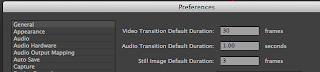
Go to Adobe Premiere>Preferences in the upper left hand corner and change the Still Image Default Duration to 3. (If your pictures play too slow after changing these settings try changing them to 2).


Next, go to File>Import and your picture folders. Note: import each day of photos in their own folders. DO NOT MIX THE PHOTOS.
 Drag the picture down to the timeline. You can now see all of your pictures in a row.Time to edit!


Best Images in Action Sports November 2013


http://xgames.espn.go.com/gallery/9895410/best-images-action-sports-november-2013
Click link above to browse through these pictures.

Thursday, October 31, 2013

Photomerge Assignment


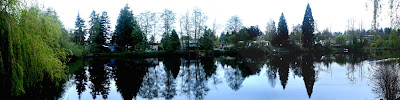
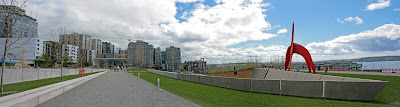
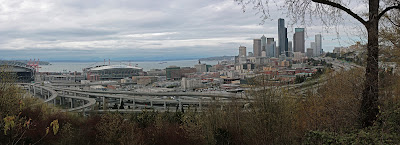
Your assignment over the next five to six days is to take multiple landscape panorama style photomerges.  Take a picture and then move the camera slightly up or sideways to take another "connected" image. Basically you combine smaller pictures to make one larger picture.

Use a tripod if possible. Remember to manual adjust white balance or select something like "cloudy" or "sunny" on your camera.


Here is how you connect multiple pictures in Photoshop.

To set up a new Photomerge composition:
Do one of the following:
Choose File > Automate > Photomerge.
In the File Browser, select the images you want to use and then choose Automate > Photomerge from the File Browser menu bar
In the dialog box, choose an option from the Use pop-up menu:
  • Files to generate the Photomerge composition using individual files.
  • Folders to use all the images stored in a folder to create the Photomerge composition. The files in the folder appear in the dialog box.
  • Open Files to use the image files you have open in Photoshop.
Click the Browse button to navigate to the source files or folder you want to use to create the Photomerge composition. Select Attempt to Automatically Arrange Source Images if you want Photoshop to try to line the images up in their proper order.
Then edit your picture as you need.

Here is a tutorial you can use to get you going.
http://www.youtube.com/watch?v=qrNI-gAuI5s


Tentative schedule

Friday: Practice at school up by the track,the front of the school or Hamlin. Take five different photomerges comprised of 3-5 pictures each.
Return to class at 11:30.
Merge your pictures in Photoshop using the directions above.

Weekend Homework: Go to one landscape location and shoot five different photomerges. This means you will shoot about 15-20 pictures
Monday: editing
Wednesday: shooting day, go to an AWESOME landscape location to take more pictures


Wednesday, October 30, 2013

Action Photo Editing

Please select your twelve best action photos.
These pictures should show faces, be 95% in focus, fill the frame, and showcase interesting angles and composition.
Eight of these photos need to be from your SC club, sport, or event pictures.
Crop, adjust, and color correct all pictures.

Edit two pictures into Grayscale.
Edit two pictures using Selective Focus.
Edit one picture using one-item kept in color.
Edit the other seven pictures in what ever manner you see fit.

Turn in your twelve adjusted photos and call them Action Adjusted.
Turn in your best SC action picture for printing. Call it Best Action for printing.

If you took pictures for Swimming, Football, Cheer, or Flags please create a folder with your best, in-focus pictures and turn them into Ms. Johnson's Drop Box on the Staff Server. Please let Ms. Johnson and the yearbook staff know that your pictures are in the Drop Box.

Tuesday, October 29, 2013

Digital Photo: Are you caught up?

Have you turned in Action CS1 and Action CS2?
Did you shoot 50 action pictures of a SC sport, club , or group?

Stop Motion Assignment


Your next project is a 600-800 frame stop motion animation assignment. You will work in groups of three to four to make people do things that aren't possible in real life.
You will have two full class periods to shoot your assignment using my digital cameras. You will edit your videos in Adobe Premiere and add sound effects and music.


http://www.youtube.com/watch?v=AJzU3NjDikY

http://www.youtube.com/watch?v=MtbQ4J3RfQ8&feature=related

http://www.youtube.com/watch?v=2_HXUhShhmY&feature=related

http://www.youtube.com/watch?v=DKWdSCt4jGE


http://www.youtube.com/watch?v=qBjLW5_dGAM

http://www.youtube.com/watch?v=BpWM0FNPZSs&feature=related

http://www.youtube.com/watch?v=o2pvO-FEqq4&feature=related

http://www.youtube.com/watch?v=5m23bL9AqB0&feature=related

http://www.youtube.com/watch?v=cYhhfHYZa5s&feature=related

Stop Motion Pre-Production

Please get in your groups and start planning your production.

1. Please use TEXT EDIT and turn in the following information in the STAFF server:

  • Group Member names
  • A four to five sentence description of your animation project. 
  • Please tell me what special "tricks" you will create to make your animation look interesting. What will your characters do that they can't do in real life?
  • Also, let me know if you are using props or if the characters are wearing costumes. Who will wear what outfits?
  • Most importantly please tell me the story from beginning to end.
  • What type of music will you use? Why?
  • What kind of sound effects will you add?
2. Create a storyboard of the first 45 frames.

 Each video will need:

1.                 Fade In/Out

2.                 Titles

3.                 Credits

4.                 Music and sound effects

Tuesday, October 15, 2013

Action Script 2.0: Stops and Mouse Control

Button:
http://www.youtube.com/watch?v=NLP7A9IYptU

Action Script 2.0
http://www.youtube.com/watch?v=PdvPEaoU7tg&feature=related

Action Script 2.0

http://www.youtube.com/watch?v=Q-QkWaY9y1o&feature=related


To create a STOP action script on the TIMELINE do the following:
1. Create a STOP layer on your animation timeline.
2. Control click and select Actions.
3. Under TIMELINE CONTROL in the upper left hand corner double click STOP.


To create ACTION SCRIPT for your button do the following:
1. Click the frame that your button appears in the timeline (make sure your button is on it's own layer).
 2. Select directly on your button you have created down in the work area (not on the timeline).
3. Control Click>Actions
4. Under MOVIE CLIP CONTROL select ON and then RELEASE

5. Move the cursor to the second line
6. Under TIMELINE CONTROL select GOTO AND PLAY and then type in the frame where you want the button to transport the gamer player on the timeline.
Note: at the bottom of the Action Script commands under Current Selection your button should be selected under current selection:


Monday, October 14, 2013

Manual Settings Class Assignment 2


1.Panning

You should shoot 10-12 SUCCESSFUL panning style pictures using shutter speeds of around 1/20-1/60. Shoot just like the motorcross photographer suggested.
Suggested activities to shoot: someone running across the field, someone doing back handsprings or other gymnastic moves, anyone playing catch with a football or baseball, and hackysack etc.  
2. Regular Action Shooting

Then shoot 10-12 pictures of moving subjects using traditional fast shutter speeds (usually 1/250-1/2000).
Have your subjects repeat the same action over and over.

 Suggested activities to shoot: someone running across the field, someone doing back handsprings or other gymnastic moves, anyone playing catch with a football or baseball, and hackysack etc.  


3. Depth of Field Practice

Put the camera in AV (aperture mode).
Shoot 10 Shots of the exact same subject from the exact same angle.
Adjust the Aperture from low to high between each shot.
I would suggest shooting a flower or tree with something else in the background.

You will turn in three Contact Sheets at the end of the period named Panning, Action, and Aperture.

Wednesday, October 09, 2013

Photo 1: Aperture and Shutter Speed

Manual Adjustments:Aperture and Shutter Speed

http://cybercollege.com/tvp012.htm
http://www.picturecorrect.com/photographytips/208/aperture_fstops_camera_settings.htm

http://en.wikipedia.org/wiki/Aperture
http://en.wikipedia.org/wiki/F-number


F-Stops and Shutter Speed Hints

Please take detailed notes in your own words on the top two reading assignment. You will using the material you learn this week on the cameras.

Camera simulator:
http://www.photonhead.com/simcam/shutteraperture.php

http://www.kamerasimulator.se/eng/?page_id=2

http://dryreading.com/camera/index.html

htthttp://camerasim.com/camera-simulator/

Grayscale Adjustment Assignment

First, adjust all of your pictures into the various grayscale methods we have discussed in class. Start with the man-made shadow pictures you shot over the last couple of days.

When you are done you are going to turn in your best 20 pictures in a Contact Sheet called Grayscale Adjusted. Please make sure you have all adjustment methods included you must have at least two man-made shadow pictures.

The adjustment methods: Basic Black and White (BBW), Calculations Method (CM), Lightness Channel (LC), Ansel Adams(AA), Duotone (DUO), and Basic Channel Mixer (BCM).

Please save and name each picture with the appropriate adjustment method abbreviation (BBW or CM etc.)


Finally, turn in your Best Grayscale picture as a .jpg file.

Monday, October 07, 2013

Choose Your Own Adventure Animation Assignment

CHOOSE YOUR OWN ADVENTURE ASSIGNMENT:
For this project you will be creating an adventure of some sorts that pauses periodically and gives the viewer a choice in where the story goes, thus a "choose your own adventure" tale! Your movie must contain:

* 8 Buttons

* goto and play
* stop
* up, over, down, hit states
* no stick figures
*multiple motion and shape tweens
* movie clips
* at least three instances of sound, sound should FILL your animation
At least three places where decisions need to be made


Please answer the questions below in Text Edit and drop the responses into the Staff Server>Mitchell>Classes>Period 2 or 4.

* Who are the characters? List at least two.
Where does the story take place?List precise location with details.
* What is the main story from beginning to end? What is the main character trying to do?
* What are the options in the choose your own adventure? What are the outcomes?
* How will your animation be more interesting and better looking than your last project?

Tuesday, October 01, 2013

SCNN Commercials: Export your Animation Project and Turn It In To the Vidstore Server


Exporting From Flash to Quicktime

File>Export>Export Movie>Quicktime

Save it using the naming convention. Save it in your movies folder.
Change the Store temporary file to disc.


Next, log onto to Vidstore.shorelineschools.org and drop it in the period 2 or 4 folder.

  • Click on your desktop background.
  • Go
  • Connect To Server
  • Vidstore
  • name:scvideo
  • password:Outback23
  • SC Video Classes
  • Drop the Quicktime file into the 2nd or 4th period folder.

Wednesday, September 25, 2013

Grayscale: Patterns and Shadows

Digital Photo 1: Grayscale: Pattern and Shadow Assignment


Your assignment over the next two weeks is to shoot 24 pictures involving man-made shadows and 24 other images involving lightness/darkness relationships with a focus on patterns. 48 pictures total.

  • Contact Sheet 1 is due next Wednesday the 2nd.
  • Friday the 4th is an off-campus shooting day. Contact Sheet 2 is due at the end of the period Friday.
  • Students have homework over the weekend and need to shoot one more Contact Sheet of Shadow and Pattern pictures.

Monday, September 23, 2013

Landcape Editing

 
-->
10 Best Landscape Pictures: All Pictures Should Look "Real"


  • 1 Black and White (Grayscale)
  • 1 Selective Focus
  • 1 One-Item Kept in Color
  • 7 Adjust the best you can


You will create a 10 picture contact Sheet called “Landcapes Adjusted.”

You will also send in your best picture as a separate jpeg called “Best Landscape.”

Due Wednesday at 10:45

 
Landscape Grading Information:
·     Is a wide shot with a combination of trees, water, mountains, and other natural elements?
·     Does it have a foreground, mid-ground, and background?
·     Is the entire picture in focus (large Depth of Field)
·     Is it an INTERESTING subject?
·     Is the horizon line in the upper or lower third?

Monday, September 16, 2013

SCNN Commerical

Your next assignment will be a 15-25 second SCNN commercial for anything school related. This could include a dance, a game, a club, an event, or anything else. Content must be related to the specific school related item.
All animation should look sharp and detailed.
Use school colors where appropriate.


Your animation needs to include:

  • Music AND sound effects throughout
  • Keyframe animation
  • Shape tween
  • Two Motion Tween
  • Two Movie Clips
  • Text that says either "SCNN" or the information for the school club, group, or event
  • Voices created by you using Garageband or other programs
Most of these projects will be between 200 and 400 frames each at 12 frames per second.

First step: Commercial Treatment

You will write a detailed commercial treatment and send it to the coach or advisor of your club/activity/sport etc. You will ask for their permission to make a commercial and also for suggestions. You will also send me a copy (CC) of this email.


List of advisors:
http://learn.shorelineschools.org/shorecrest/sasb/index.php#list_of_clubs
School event Calendar


Treatment questions you must answer in COMPLETE sentences.


  1. What group or activity have you selected as your subject?
  2. Why did you select this group and why do you think you can make an interesting commercial for this group?
  3. What is your original concept? How are you going to SELL your subject?
  4. What will your tag line be? It needs to be something catchy and memorable.
  5. What kind of music will you use in the background?
  6. Please email the advisor or coach of your commercial subject ask permission to create a commercial using your concept. Include me on this email.