Read and take notes. There will be a note check today.
Shooting vertical or horizontal
http://www.kodak.com/ek/US/en/Home_Main/Tips_Projects_Exchange/Learn/Photo_Tips_Techniques/Advanced_Techniques/Composing.htm
Choosing a main point of interest
http://wwwca.kodak.com/CA/en/consumer/guideToBetterPictures/eStores/index.jhtml?style=&cat=9&subCat=1
Adjusting your angle of view
http://wwwca.kodak.com/CA/en/consumer/guideToBetterPictures/eStores/index.jhtml?style=&cat=9&subCat=2
Placing the subject off-center
http://wwwca.kodak.com/CA/en/consumer/guideToBetterPictures/eStores/index.jhtml?style=&cat=2&subCat=5
Using leading lines
http://asp.photo.free.fr/Composition/photoProgramCompClass41.shtml
Click NEXT for examples.
Avoiding distracting backgrounds
http://asp.photo.free.fr/Composition/photoProgramCompClass62.shtml
Click NEXT for examples.
Including foreground objects
http://wwwca.kodak.com/CA/en/consumer/guideToBetterPictures/eStores/index.jhtml?style=&cat=2&subCat=6
Project
After reviewing the rule of thirds and visiting the above assigned Kodak sites, you are to photograph the following
Plan Your Photo Composition (36 works):
1. Hands (such as braiding hair, holding something, working on something) (4 works)
2. Feet/Shoes (4 works)
3. Geometric Shadows/Forms (4 works)
4. Organic Forms and/or Texture (4 works)
5. White on white/eggs (4 works)
6. Lines (4 works)
7. Glass/transparency (4 works)
8. The remaining photos are your choice (8 works)
You will most likely shoot 350-400 pictures to get 36 total picture. In general plan on shooting at least 10 shots per turned in picture.
October 4: Read and take notes. Then explore the web looking for examples of each composition and subject listed above. You can take practice pictures as well.
Thursday October 4: Out of class shooting day (you can shoot in the studio if necessary)
Tuesday October 9: Import and Editing
Thursday October11: Out of class shooting ((you can shoot in the studio if necessary)
Friday October 12: Import and editing
Tuesday, October 02, 2012


Wednesday, September 26, 2012
Next Animation Assignment: SCNN Commercial
Your next assignment will be a 15-25 second SCNN commercial for
anything school related. This could include a dance, a game, a club, an
event, or anything else. Content must be related to the specific
school related item.
All animation should look sharp and detailed.
Use school colors where appropriate.
Your animation needs to include:
The Shorecrest Web Site: http://schools.shorelineschools.org/shorecrest/
Fall Sports Teams: http://schools.shorelineschools.org/shorecrest/asb/athletics.php#teams
Here is a list of clubs:
http://learn.shorelineschools.org/shorecrest/sasb/index.php#activities_clubs_organizations
All animation should look sharp and detailed.
Use school colors where appropriate.
Your animation needs to include:
- Music AND sound effects throughout
- Keyframe animation
- Shape tween
- Two Motion Tween
- Two Movie Clips
- Text that says either "SCNN" or the information for the school club, group, or event
- Voices created by you using Garageband or other programs
The Shorecrest Web Site: http://schools.shorelineschools.org/shorecrest/
Fall Sports Teams: http://schools.shorelineschools.org/shorecrest/asb/athletics.php#teams
Here is a list of clubs:
http://learn.shorelineschools.org/shorecrest/sasb/index.php#activities_clubs_organizations
Monday, September 24, 2012
Photo Students: work you should have turn in
Composition 1
Composition 2
Composition 3
Landscape CS
Landscape 2
Composition 2
Composition 3
Landscape CS
Landscape 2
Wednesday, September 19, 2012
First "Real" Animation Assignment
Animation Assignment
- 5+ layers
60+ frames
15+ keyframes
foreground, mid-ground, and background
both shape and motion tweens - 2 Movie Clips
- All items on separate layers
- 12 FPS
Tuesday, September 18, 2012
Photography: Tuesday Class Work
- 10 landscape shots showing proper use of the horizon line (I would shoot from the baseball, football, and softball fields). Please try to show foreground, mid-ground, and background if possible
- 3 Shots Tonal Balance
3 Shots Balance Mass
3 Shots Patterns
Turn your Contact Sheet into the Staff Server>Classes>Period 4.
Thursday is your first off-campus shooting day for landscape pictures. You can only leave campus if you have Composition 1,2, and 3 turned along with your off-Campus permission form.
- Please pick an interesting location like Gasworks Park, Kerry Park, Richmond Beach, or the Edmonds Ferry Terminal.
- Arrange rides today. Talk to your friends, parents, or arrange your bus schedule.
- Sign out at the beginning of TAP.
Monday, September 10, 2012
Digital Photo: Composition Reading and Homework
This is not a writing intensive course, but there is some reading the first couple weeks of class.
Please take notes on the bold faced words as you read from the links below. You will be shooting the various composition elements this weekend and next week. We will also have a quiz on this material as well.
Bring your cameras on Friday.
Wednesday's Reading and Homework:
Homework:
http://www.microsoft.com/windowsxp/using/digitalphotography/learnmore/composition.mspx
In Class reading:
http://photoinf.com/General/Geoff_Lawrence/Composition.html
(Take quizzes at the end of each section below)
http://cybercollege.com/tvp023.htm Start reading at "Strive for Feeling of Unity"
http://cybercollege.com/tvp024.htm
http://cybercollege.com/tvp025.htm
This Thursday during class you will shoot 24-36 pictures with at least six different subjects. Please shoot three Rule of Thirds shots, three Unique Angle shots, three leading lines shots and three frame within a frame (using other objects to frame your subject) shots.
Homework: Do the same assignment except use subjects and objects away from school.
Due Monday the 17th of September: 12 INTERESTING shots using all four techniques described above. Some people will take 40-80 pictures for 12 good ones.
First Animation Assignment 2012
I would like you to visit the following websites and watch a variety of flash animation.
When you are done watching the animation (spend about 30-35 minutes or so on this) I would like you to tell me what your three favorite flash movies were and why you liked them.
Did you like the storyline? Animation style? Sound effects? Music?
Please list this information, along with the link to access the animation, in the comments section below. Don't forget to put your name at the beginning so I know you did your work. Please use headphones.
http://www.google.com/#hl=en&sugexp=gsis,i18n%3Dtrue&cp=8&gs_id=r&xhr=t&q=flash+animation&qe=Zmxhc2ggYW4&qesig=4HzSe-7WX88H955yLaEwJw&pkc=AFgZ2tmWnBPedwme1MAPR0IZWb6hGzKL87L_oLRBub29FOmOGiZsvxlRoixp1KAnPnmFgVptKUxydmG2-3nd3yE7QtnyFR_ObA&gs_sm=&gs_upl=&um=1&ie=UTF-8&tbo=u&tbm=vid&source=og&sa=N&tab=wv&bav=on.2,or.r_gc.r_pw.r_cp.&fp=47b7749a5a622465&biw=1779&bih=941&surl=1&safe=active
http://youtube.com/results?search_query=flash+animation+movies&search_type=&search=Search
Welcome to class! Don't forget to fill in the comment section with your favorite videos. Log in as anonymous and then write your name and class period at the top of your comment.
Mr. Mitchell
When you are done watching the animation (spend about 30-35 minutes or so on this) I would like you to tell me what your three favorite flash movies were and why you liked them.
Did you like the storyline? Animation style? Sound effects? Music?
Please list this information, along with the link to access the animation, in the comments section below. Don't forget to put your name at the beginning so I know you did your work. Please use headphones.
http://www.google.com/#hl=en&sugexp=gsis,i18n%3Dtrue&cp=8&gs_id=r&xhr=t&q=flash+animation&qe=Zmxhc2ggYW4&qesig=4HzSe-7WX88H955yLaEwJw&pkc=AFgZ2tmWnBPedwme1MAPR0IZWb6hGzKL87L_oLRBub29FOmOGiZsvxlRoixp1KAnPnmFgVptKUxydmG2-3nd3yE7QtnyFR_ObA&gs_sm=&gs_upl=&um=1&ie=UTF-8&tbo=u&tbm=vid&source=og&sa=N&tab=wv&bav=on.2,or.r_gc.r_pw.r_cp.&fp=47b7749a5a622465&biw=1779&bih=941&surl=1&safe=active
http://youtube.com/results?search_query=flash+animation+movies&search_type=&search=Search
Welcome to class! Don't forget to fill in the comment section with your favorite videos. Log in as anonymous and then write your name and class period at the top of your comment.
Mr. Mitchell
Thursday, June 14, 2012
Multimedia: Super Hero Comic Book Cover
Your last assignment in this class is to create a super hero comic book cover.
First, you will make the text.
Next, you will make at least one character using shapes, the pen tool, and any other tools of your choice.
You can add other characters and action as needed, but you must have the text and at least one character.

First, you will make the text.
Next, you will make at least one character using shapes, the pen tool, and any other tools of your choice.
You can add other characters and action as needed, but you must have the text and at least one character.
Tuesday, June 12, 2012
Thursday, May 31, 2012
Self Portrait Editing
1 vignette
1 soft focus background
1 selective focus background
1 black and white
1 Instagram
1 heavily cropped
1 one-item left in color
1 over saturated color
1 with extreme color change to hair or clothes etc.
1 of your choice
Use patch tool and clone stamp to touch up blemishes and redness etc.
Whiten teeth.
Fix over or under exposed pictures.
1 soft focus background
1 selective focus background
1 black and white
1 Instagram
1 heavily cropped
1 one-item left in color
1 over saturated color
1 with extreme color change to hair or clothes etc.
1 of your choice
Use patch tool and clone stamp to touch up blemishes and redness etc.
Whiten teeth.
Fix over or under exposed pictures.
Thursday, May 24, 2012
Tuesday, May 22, 2012
SCNN Commercial
4th Period
Students need to FINISH their
SCNN commercial this period. SCNN airs tomorrow.
·
Please record your voice
using the headsets at the font of class.
·
Open Garageband before
you plug in the headset
·
Export your voice
component from Garageband using “Share to Disk” and saving it as an MP3.
·
Add your audio in Flash
using File>Import to Library
·
Make sure all of your
sounds are on different layers.
Turn your projects into the
vidstore server Period 4.
Sunday, May 13, 2012
Photo 2: Fashion Work
Fashion Cover Work
You will create a magazine cover page using your best Fashion picture. You will also create a eight-picture photo spread that details what your subject is wearing. Before I give you some tutorial examples, here and here are some example covers. Click on the images to get ideas for your cover.
Before you start your cover, you need to edit and adjust your pictures to make them look professional. Here is a list of adjustment methods we did last semester:
Clone Stamp (CS)
Patch Tool (P)
Gaussian Blur (GB)
Color Hair (CH)
Whiten Teeth (W)
Removing Hot Spots (HS)
Healing Method (HM)
Glamour Skin Softening (GS)
If you do not remember how to do these adjustments feel free to use the Photoshop book at the front of the room. Take your time. You have a few days to adjust your pictures and make your cover and picture spread. The bottom line is this: get rid of blemishes, tone down hot spots or glare, soften the skin, adjust colors for emphasis, use black and white (greyscale) if necessary, crop for effect, and play around with brightness/contrast etc.
Magazine Cover Tutorials: You can use the tutorials or create a cover without a tutorial.
http://www.myphotoshoptutorial.com/2009/01/easy-magazine-cover-in-photoshop/
http://www.tutorialstraining.com/cstutorials/advertisingdesign/magazine/twistrcodedtutorial.htm
http://huzeyk.blogspot.com/2006/02/magazine-cover-masthead-editing.html
http://www.tutorialized.com/view/tutorial/On-the-Cover-of-Rolling-Stone-Magazine-Cover-in-Photoshop/32171
After you create your cover you need to add text to eight of your pictures. This text, done in the same style as the Action Pics and Spring Quote Pics, should tell us the brand of each item of clothing like this example:
A quote from the subject or something interesting about the items is also a nice touch.

Thursday, May 10, 2012
Multimedia: SCNN Commercials
Pick an event or school activity that takes place between May 18 and June 8th.
Create a 15-20 second commercial for this even that includes the following:
Create a 15-20 second commercial for this even that includes the following:
- Two Movie Clips
- One Shape Tween
- Two Motion Tween
- Detailed Backgrounds
- Seven Layers
- Music in the entire clip
- sound effects as needed
- voice over (your voice or someone else's voice)
Wednesday, May 09, 2012
Stop Motion 2: what is needed?
Your second Stop Motion assignment is essentially the same as the last one, except that instead of animating people you are animating objects of your choice.
What you need:
What you need:
800 Pictures (all in focus)
Fade In/Out
Titles
Credits
Music
Eight instances of sound effects
Tuesday, May 08, 2012
Digital Photo2: Fashion Shoot Assignment
Fashion Magazine Assignment
You are working for a fashion magazine that sells clothing to a specific audience. Your job together is to shoot two picture spreads to sell two different styles of clothing and accessories. This includes pants, coats, shirts, scarfs, shoes, socks, belts, dresses, shorts, and anything else a person can wear.Your pictures should show a variety of composition and also showcase a variety of ways to light your subject. Please review lighting techniques here.
Please review portrait tips here.
Please look through, watch, and read about the following fashion shoots.
Examples:
Beyond The Sea
Grey Gardens
In the Trenches
Megan Fox
True Blood
Jessica Biel
Katy Perry
Lighting
Fashion Setup
Requirements:
You must choose a partner from class.
You will model for each other on Thursday and Tuesday.
You will shoot one day outdoors and one day in the studio.
Your location away from school needs to be unique and interesting on it's own.
Get creative. Play dress up. Dress stylishly and/or uniquely.
Please get together with your partner and answer the following questions using Text Edit. This is due on Tuesday/Wednesday.
1. What are your names?
2. What two magazines are you shooting pictures for? Why? What types of clothing are you trying to sell?
3. What day are you using the studio?
4. What specific clothing will you wear each day? What accessories will you bring to enhance your shoot?
5. Where do you want to shoot outside of school? Why?
6. How will you ensure that you give 100% on this project? What can you do to make these pictures the best pictures you've taken in class?
7. How will you use lighting to make your pictures interesting? Be specific.
Bring your cameras Thursday. If you are shooting away from school you can go directly to your shooting location.
Monday, April 30, 2012
How to Adjust Your Arch_City_Still Pictures
You will adjust 24 good pictures, eight from each category.
12 of these pictures will be black and white (grayscale).
6 must be full color.
6 Adjustments of your choice.
Work through all of the tutorials listed below and remember to save the picture using the name of the conversion:
Seven Grayscale Conversions
Grayscale Color Mode
Channel Mixer 1
Channel Mixer 2
Metallic
Adjustment Layer
Split Toning
Adding Grain
12 of these pictures will be black and white (grayscale).
6 must be full color.
6 Adjustments of your choice.
Work through all of the tutorials listed below and remember to save the picture using the name of the conversion:
Seven Grayscale Conversions
Grayscale Color Mode
Channel Mixer 1
Channel Mixer 2
Metallic
Adjustment Layer
Split Toning
Adding Grain
Tuesday, April 17, 2012
Spring Quote Edits
10 Adjusted pictures with text. Please include:
One item Left in Color
Best Depth of Field
Best Selective Focus
One Hypercolor or Oversaturated Picture
One darker picture or limited light picture
One High Contrast
Four of your choice (may include Instagram Actions)
Turn in 10 Spring Quote Adjusted
Best Spring Quote Picture: This picture should look amazing.
One item Left in Color
Best Depth of Field
Best Selective Focus
One Hypercolor or Oversaturated Picture
One darker picture or limited light picture
One High Contrast
Four of your choice (may include Instagram Actions)
Turn in 10 Spring Quote Adjusted
Best Spring Quote Picture: This picture should look amazing.
Digital Photo 2: Still Life, Architecture, and City Scape

Your next assignment is very large in scope and includes a variety of picture styles.
I am including still life, architecture, and city scapes as one assignment because many of you will be in a variety of places for spring break. You will shoot contact sheets for all three categories. However, in what order you choose to do shoot them is up to you.
Still Life Examples

Cityscape Examples

Schedule
Shooting Day 1: April 19
Shooting Days 2 and 3: Spring Break
Importing and editing April 30 and May 1
Shooting Day 4: May 3 and Pictures Due
May 4: Editing
Sunday, April 15, 2012
Monday April 16th
2nd Period:
Please edit your best 10 Spring Quote pictures. You don't need to worry about adding text yet.
4th Period:
Please spend the entire period planning, designing, and brainstorming your Teen Magazine assignment.
Here is what is the due at the end of the period:
Get a blank sheet of paper and design a rough draft of your magazine.
Please include: title of magazine, layout of pictures, headlines, and anything else that will make your magazine stand out.
Don't forget, Tuesday is a shooting day. You and your partners need to dress appropriately.
5th Period:
1. Make sure you have all of your stop motion pictures on your computer. Put all of these pictures into one folder on the desktop.
2. Open Final Cut Pro and create a new project
3. Select Final Cut Pro in the upper left hand corner and then select User Preferences. Change the Still Frame Duration in the upper left hand corner to 00:00:00:05. (Click here to see a detailed tutorial).

4. Go to File>Import and Select folder. Pick your Stop Motion pictures folder. The folder will show up in the Browser in the upper left hand corner.
5. Drag pictures into timeline as shown here. Lengthen, shorten, or delete clips as needed.
6. Import music and sound effects to Final Cut: File>Import>File Pick music and sounds that work for your video. We need sound throughout the entire animation.
7. If you have not used Final Cut before you need to watch this video in order to understand the layout.
Please edit your best 10 Spring Quote pictures. You don't need to worry about adding text yet.
4th Period:
Please spend the entire period planning, designing, and brainstorming your Teen Magazine assignment.
Here is what is the due at the end of the period:
Get a blank sheet of paper and design a rough draft of your magazine.
Please include: title of magazine, layout of pictures, headlines, and anything else that will make your magazine stand out.
Don't forget, Tuesday is a shooting day. You and your partners need to dress appropriately.
5th Period:
1. Make sure you have all of your stop motion pictures on your computer. Put all of these pictures into one folder on the desktop.
2. Open Final Cut Pro and create a new project
3. Select Final Cut Pro in the upper left hand corner and then select User Preferences. Change the Still Frame Duration in the upper left hand corner to 00:00:00:05. (Click here to see a detailed tutorial).

4. Go to File>Import and Select folder. Pick your Stop Motion pictures folder. The folder will show up in the Browser in the upper left hand corner.
5. Drag pictures into timeline as shown here. Lengthen, shorten, or delete clips as needed.
6. Import music and sound effects to Final Cut: File>Import>File Pick music and sounds that work for your video. We need sound throughout the entire animation.
7. If you have not used Final Cut before you need to watch this video in order to understand the layout.
Thursday, April 12, 2012
Next Multimedia Assignment: Teen Magazine
Teen Magazine!!!


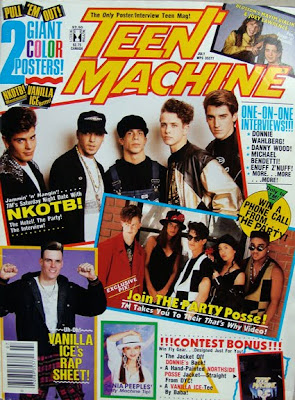
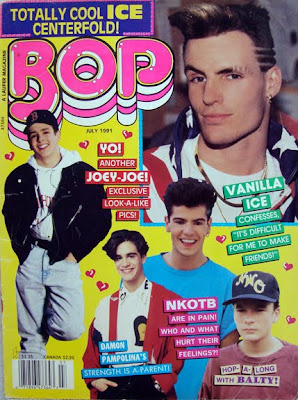
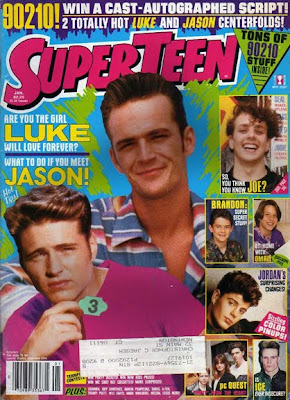
Magazine publishers, editors, and circulation directors know the importance of the cover image as both a newsstand impulse buy and as a brand. 80 percent of consumer magazines’ newsstand sales are determined by what is shown on the cover, a fact that can mean the difference between a magazine’s success or failure over time. The cover image and design reinforce the brand, an important identification factor because the average reader spends only three to five seconds scanning a magazine cover before deciding whether to buy that issue. Magazine covers not only offer information about what’s inside a particular issue, they also provide significant cultural cues about social, political, economic, and medical trends. As both historical artifacts and marketing tools, magazine covers deserve closer study.
NOTE: Teen magazines are not tabloids... they should be positive by nature, not mean, slandering, etc.
Your Job
You need to design a magazine cover using Adobe PhotoShop and your own pictures. Your magazine cover can be based off of an existing magazine, for example use the layout and name of Teen magazine, but design your own photos, titles and story lines, or create your own magazine totally from scratch, around an interest you have. For example, create a magazine based on Rats, Shopping, a Boy/Girls Life in Middle School, or Fossils, etc.
You must have:
1. A background
2. A main cover photo (may have smaller photos to show other features included in the magazine)
3. A Title, with Unique text effects
4. Several story line titles
5. Issue date
6. Issue price & bar code
7. Minimum of 5 images taken by YOU
Your magazine cover will be graded on if you included the above elements and how you carry out Unity in your magazine cover.
_____Unity can be achieved by carrying out a common theme in the type styles, photos, story titles and descriptions. Do all the parts work together?
_____Think about readability, can you read the type against the background? Is the type style readable? Are the sentences too long? Are the titles descriptive enough to make you know what the article is about? Does the type size signify the importance?
_____Does the photo or photos support the theme? Does the photo catch your eye? Is it too busy or too simple?
_____How is your effort and craftsmanship? You will need to be selecting, cutting, pasting and cropping. Does your cover look professionally neat?
_____Layout, how did you arrange all the elements? Is the type all lined up flush left, right, centered? Is the type over the picture or a background? Did you add a banner with the issue date, web site, and cost? Does the layout make it easy to read or confusing?
Photoshop Text Tutorials
Photoshop Text Tutorials 2
Schedule:
Thursday April 12: Planning, Brainstorming, and Sketching
Monday April 16: Photography Lesson
Tuesday April 17: Shooting Pictures in Class using classmates or other students
Thursday April 19: Photoshop Design and Layout
Photo Simulators
http://www.kamerasimulator.se/eng/?page_id=2
http://camerasim.com/camera-simulator/
Practice Manual Depth of Field.
http://camerasim.com/camera-simulator/
Practice Manual Depth of Field.
Monday, April 09, 2012
Animation: Stop Motion Assignment
http://www.youtube.com/watch?v=AJzU3NjDikY
http://www.youtube.com/watch?v=MtbQ4J3RfQ8&feature=related
http://www.youtube.com/watch?v=2_HXUhShhmY&feature=related
http://www.youtube.com/watch?v=DKWdSCt4jGE
http://www.youtube.com/watch?v=qBjLW5_dGAM
http://www.youtube.com/watch?v=BpWM0FNPZSs&feature=related
http://www.youtube.com/watch?v=o2pvO-FEqq4&feature=related
http://www.youtube.com/watch?v=5m23bL9AqB0&feature=related
http://www.youtube.com/watch?v=cYhhfHYZa5s&feature=related
Stop Motion Pre-Production
Please get in your groups and start planning your production.
1. Please use TEXT EDIT and turn in the following information in the STAFF server:
- Group Member names
- A four to five sentence description of your animation project.
- Please tell me what special "tricks" you will create to make your animation look interesting. What will your characters do that they can't do in real life?
- Also, let me know if you are using props or if the characters are wearing costumes. Who will wear what outfits?
- Most importantly please tell me the story from beginning to end.
- What type of music will you use? Why?
- What kind of sound effects will you add?
3. Create a storyboard of the first 45 frames.
Each video will need:
1. Fade In/Out
2. Titles
3. Credits
4. Music and sound effects
Spring Quote Asisgnment

"In the spring, at the end of the day, you should smell like dirt." -- Margaret Atwood
Spring is nature's way of saying, "Let's party!" ~Robin Williams
In the spring I have counted one hundred and thirty-six different kinds of weather inside of four and twenty hours. ~Mark Twain
I sing of brooks, of blossoms, birds, and bowers: Of April, May, of June, and July flowers. I sing of Maypoles, Hock-carts, wassails, wakes, Of bridegrooms, brides, and of their bridal cakes.
Robert Herrick
You will shoot two contact sheets based around two quotes about the spring season. I will list a few websites where you can find some quotes about spring, or you can find your own.
You will have shooting days on Tuesday and Thursday.
Contact sheets are due at the end of each of these days.
Next Monday you will have class time to adjust these pictures.
One of these adjustments will be a collage.
Many spring quotes are directly about the seasons and nature. However, you will find many quotes that also deal with events or sports that take place during spring time like weddings, music festivals, baseball, and golf etc. You also may find quotes that talk about spring cleaning, BBQ's, family gatherings, Easter, and Mother's Day etc.
Spring Quotes
Here
Here
Here
You may also use a quote from spring poems.
Don't forget, you can also try to find your own quotations as well.

Monday, April 02, 2012
Light Painting
Slow Shutter and Light Painting Assignment


- Make lights move yourself. (Dance with lights etc.)Examples.
- Landscape. (Sunrise or Sunset).
- Cars.
- Moving water.
- Motion Tracking. (Zoom in, tripod helps).
A video Tutorial on how to "Light Paint":
Tips on How to Light Paint [VIDEO TUTORIAL]


Thursday, March 29, 2012
Digital Photo 2: Turning in Action Photos
1. Edit your 8-15 best
Shorecrest Action Photos. Do not add text.
2. Create a folder with all
edited SC Action Pictures. Name the folder using the naming convention with the
sport name as the subject.
3. Drop your SC Action Photos
into the Vidstore>Public>Photo J>Spring Sports Folder
Go
Connect to server
Vidstore.shorelineschools.org
Name: scvideo
Password: Jetta23
Sc video classes
Public Folder
Photo J
Spring Sports Photo 2
4. Start editing your “other”
action photos.
5. After all your edits are
complete you should start adding text. Please describe the who, what, where,
why, and how of each picture. Don’t forget to use full student names.
6. Turn in your best 10
Action Photos adjusted w/text (both sports/activities). Call this Action Photos
Adjusted CS.
7. Turn in your Best Action
Photo for printing.
8. Create a Weebly website.
On this website create a Action Photo Slideshow. Copy/paste text as needed. You
can have up to 16 pictures.
Tuesday, March 27, 2012
Multimedia Music Video Assignment
Requirements:
Students will shoot a music video that is at least two minutes but no longer than three minutes.
Unlike music videos in my Video 1 class, I encourage you to make these videos as bizarre and weird as possible.
Some suggestions:
Students may work was many people as they want, but everyone must edit their own version of the video to their own Garageband created song.
Students must turn in a one-page typed treatment.
1. What is your story or concept in great detail? What makes this idea interesting? Don't forget costumes, editing and shooting style etc. Your answer should be 4-5 sentences.
2. Who are you working with on this project (inside or outside of class) if anyone?
3. When will you shoot? You can shoot all period Thursday and you may also shoot outside of class.
4. Do you have your own video camera or cell phone camera?
Please drop you responses into the Staff server, Period 4.
Raw footage to import into Final Cut is due next Tuesday.
Students will shoot a music video that is at least two minutes but no longer than three minutes.
Unlike music videos in my Video 1 class, I encourage you to make these videos as bizarre and weird as possible.
Some suggestions:
- Use the Green Screen
- Use Stop Motion Photography
- Move the camera rapidly from shot to shot, slow down for a second, and move again
- Use special effects and filtering in Final Cut
- Use multiple props or costumes if people are in your video
- Reverse, speed up, and slow down clips
- Layer clips in Final Cut to create ghosting effects
- Use the motion tab keyframes in Final Cut to zoom and pan across the video
- Use other programs like Flash or Photoshop as needed
- Use pictures in addition to video
Students may work was many people as they want, but everyone must edit their own version of the video to their own Garageband created song.
Students must turn in a one-page typed treatment.
1. What is your story or concept in great detail? What makes this idea interesting? Don't forget costumes, editing and shooting style etc. Your answer should be 4-5 sentences.
2. Who are you working with on this project (inside or outside of class) if anyone?
3. When will you shoot? You can shoot all period Thursday and you may also shoot outside of class.
4. Do you have your own video camera or cell phone camera?
Please drop you responses into the Staff server, Period 4.
Raw footage to import into Final Cut is due next Tuesday.
Wednesday, March 21, 2012
For this project you will be creating an adventure of some sorts that pauses periodically and gives the viewer a choice in where the story goes, thus a "choose your own adventure" tale! Your movie must contain:
* a cohesive and easy to follow storyline
* At least three places where decisions need to be made
* 8 interactive Buttons with up, over, down, hit states
* detailed and moving backgrounds
* no stick figures
* multiple motion and shape tweens
* 4 movie clips
* at least three instances of sound, sound should FILL your animation
* goto and play Action Script
* stop Action Script
Tuesday, March 20, 2012
Action Photo Practice
You should have 10-12 SUCCESSFUL panning style pictures using shutter speeds of around 1/20-1/60 and then 10-12 pictures of regular fast shutter speeds (usually 1/500-1/2500).
How many of you remembered to bring some sporting equipment?
Suggested activities to shoot: someone running across the field, someone doing back handsprings or other gymnastic moves, anyone playing catch with a football or baseball, and hackysack etc.
If you aren't sure about the panning technique please review the motocross video with the Crocodile Hunter. The panning instruction starts at about 1:30.
You may use my cameras to shoot this assignment.
Please return to class at 9:15 so you can upload your pictures and turn in the Contact Sheets.
Both your "Official" Action Picture Contact Sheets with an SC sport and action/sport of your choice are due Monday.
Monday, March 12, 2012
Action Photo Written Assignment 2
Action Photo Hints and Tutorials
Please watch the youtube tutorials below and add helpful hints and suggestions to your "notes" from the previous actrion assignment. Make sure that you reference
http://www.youtube.com/watch?v=19z7mR_IsDU
http://www.youtube.com/watch?v=JoykOwArmXo&feature=related
http://www.youtube.com/watch?v=4K6_voFhofA&feature=related
Action Photography Slideshow: http://www.youtube.com/watch?v=c7YVeGTrZi0&feature=related
Garageband Assignment
Garageband Assignment #1
- Create a full-length song in Garageband that is 2-3 mins long – (to view time go to Control –> Show Time in LCD)
- The song should work for a specific genre of music as opposed to just random clips assembled together. For example, you should create a rock, country, or electronic song.
- The song should have distinctly different parts of the song (parts that are emphasized or de-emphasized or repeated). "Real" music has verse, middle, and chorus sections.
- The song must contain at least 6 different tracks. Most songs will have have more than six sections.
- You should include at least one sample, voice, or musical instrument
- At least 2 of the tracks must change volume multiple times throughout the song – click on the downward pointing arrow at the end of the track icons to make a track’s volumne fade in or out
- At least one track must include a segment that loops – usually created by clicking in the upper left corner of a region and dragging to the right.
Sports Photography Written Assignment 1
Sports Photography
Please read the above link in it's entirety (pages 1-7). After you take detailed notes pleasewrite down what you think are the ten most important pieces of advice.
Make sure your notes are IN YOUR OWN WORDS.
Your first SC Sports Action Shot Contact Sheet will not be due until next week.You will receive your team assignment on Friday.
Objectives foe these pictures: sharp focus, unique angles, capturing emotion, telling a story, and basically taking the viewer someplace they wouldn't normally get to be by just sitting in the stands.
Your most interesting subject may not always be the person with the ball, like the reaction shot below of the Husky bench after beating Marquette last year.
Sports Picture Slideshow

 CLIFF DESPEAUX / THE SEATTLE TIME
Monday, March 05, 2012
SCNN Commercial Treatment
Commercial Treatment
You will write a detailed commercial treatment and send it to the coach or advisor of your club/activity/sport etc. You will ask for their permission to make a commercial and also for suggestions. You will also send me a copy (CC) of this email.
List of advisors:
http://schools.shorelineschools.org/shorecrest/asb/index.php#list
School event Calendar
Treatment questions you must answer in COMPLETE sentences.
You will write a detailed commercial treatment and send it to the coach or advisor of your club/activity/sport etc. You will ask for their permission to make a commercial and also for suggestions. You will also send me a copy (CC) of this email.
List of advisors:
http://schools.shorelineschools.org/shorecrest/asb/index.php#list
School event Calendar
Treatment questions you must answer in COMPLETE sentences.
- What group or activity have you selected as your subject?
- Why did you select this group and why do you think you can make an interesting commercial for this group?
- What is your original concept? How are you going to SELL your subject?
- What will your tag line be? It needs to be something catchy and memorable.
- What kind of music will you use in the background?
- Please email the advisor or coach of your commercial subject ask permission to create a commercial using your concept. Include me on this email.
Photojournalism Photo Essay
Photo Essay...
http://en.wikipedia.org/wiki/Photojournalismhttp://en.wikipedia.org/wiki/Photo_essay
 Photo Essays tell stories with pictures in ways that words cannot. They show us the faces of joy, pain, pride and fear.
One famous photo essayist was Larry Burrows. Burrows was killed in a helicopter crash in Vietnam but his work helped show the face of war to Americans.

TimeLife.com has a Burrows memorial page that has some of his photographs including 15 photographs that served as covers for Life Magazine. This photo is from the cover of his book, Vietnam. You can see some of the photos from this link to the book on Amazon.com.
Time and Life magazines both have a long history of photo journalism. Many of these photo essays are on-line and available for viewing.
 Assignment - Photo Essay (Part 1)
In this assignment you will create your own photo essay. To help prepare you for this you should review some other photo essays and prepare a report.
Select a photo essay from the Time.com web site.
Select one essay and to review it. You will need to respond to these points in a word processing program like Text Edit:
- Did the photographer use staged photos, candid photos or both?
- Color or B&W? Did it make a difference? What factors contributed to the selection of one over the other?
- Find examples of good framing and composition and point them out. How close do the subjects feel in the photo?
- Find examples of good use of color and light. Do you see backlighting? Were the photos taken early or late in the day?
- How much narration and text support the essay?
- Do the photos in the essay stand alone or do they need to be seen as a part of the whole?
- Describe your reaction to the essay. Do all photo essays illicit a reaction in the viewer?
Criteria:
- Minimum of 8 photos
- Single theme or "story" for the essay
- Consider the following in composing your photographs:
- Color or B&W
- Composition
- Lighting
- Angle and distance to subject
- Candid or posed photos?
- Consider the need for text to accompany each photograph.
Friday, March 02, 2012
Next Project: SCNN Commercial
Your animation needs to include:
- Music AND sound effects
- Keyframe animation
- Shape tween
- Motion Tween
- Two Movie Clips
- Text that says either "SCNN" or the information for the school club, group, or event
The Shorecrest Web Site: http://schools.shorelineschools.org/shorecrest/
Here is a list of clubs:
http://learn.shorelineschools.org/shorecrest/sasb/index.php#activities_clubs_organizations
Here are the spring sports teams:
SPRING SPORTS
| ||
| Boys' Baseball - website & email | Alan Bruns | JV, V |
| Boys' Golf - website & email | Brian Story | JV, V |
| Boys' Soccer - website & email | Drew Thompson | JV, V |
| Girls' Golf - website & email | Bob Quiles | JV, V |
| Girls' Fastpitch - website & email | Jackie Berg | JV, V |
| Girls' Tennis - website & email | Wayne Abney, Rob Mann | JV, V |
| Track (coed) - website & email | Brandon Christiansen | JV, V |
Animation: Turn in Your Animation 1 Project
Please
turn in your Animation 1 Project:
File
Export
Movie
Format:
Select
Quicktime Movie
Export
Use the
naming convention to save your work
(5_mitchellt_Animation
1)
· Go
· Connect
to server
· Vidstore.shorelineschools.org
· Name:
scvideo
· Password:
Jetta23
· SC
video classes
· Drop
your file into Period 5
Tuesday, February 28, 2012
HDR Assignment
HDR
This is a new assignment for some of you and for others it's something you have done before. There are detailed instructions on how to create HDR pictures below.I'll give you some hints:
1. Use a tripod or something else completely steady.
2. Take 8-10 pictures using a variety of shutter speeds from almost dark to too bright. (Adjusting aperture only works also). Please use the snow, sun, landscape, action, firework, and beach settings etc. if you are using a camera that cannot manually adjust
3. Make sure tripod is completely steady.
4. Import pictures and put all the HDR pictures in a folder on the desktop
5 Merge pics in Photoshop using automate>merge>HDR
You should take 40-50 pictures from one awesome scenic location. This translates to five or six HDR merges. Note: review all 8-10 of your shots before changing angles.
Turn in a contact sheet with 16-20 pictures and also turn in one good HDR picture.
Email me with questions.
Weekend HDR Homework:
40-50 more pictures with some type of large subject in the foreground.
Step-By-Step HDR Instruction
Here
In the instructions above they suggest you change your shutter speed (I have successfully created HDR merges with aperture adjustment). I will recommend you try both. You CAN take HDR pictures using a point and shoot camera. Instead of adjusting the aperture you can try different settings for each picture like Beach, Snow, Clouds, and Sun etc.
HDR Pictures


Each of these pictures is actually three pictures combined, each with a different aperture setting.
Magazine 2 Adjustments
Use Photoshop to adjust your best six Magazine pictures.
Turn in your best six pictures on a Contact Sheet called Magazine 2_adjusted.
Please make sure you pick six pictures of a variety of subjects shot from a variety of locations and angles.
You should have at least one landscape, close-up, and action/activity picture.
Spend time on each picture making sure the exposure and color balance is correct.
These pictures should get people excited about visiting the city you chose.
Finally, turn in your best picture for printing by itself called Best Magazine.
Required Adjustments:
One Grayscale
Selective Focus
Vignette
Suggested adjustments:
One item left in color
Photo Filter
Brightness/Contrast
Cropping
Portraits: Gaussian Blur, Clone Stamp, and Patch Tool
Due Today
Next up: HDR
Turn in your best six pictures on a Contact Sheet called Magazine 2_adjusted.
Please make sure you pick six pictures of a variety of subjects shot from a variety of locations and angles.
You should have at least one landscape, close-up, and action/activity picture.
Spend time on each picture making sure the exposure and color balance is correct.
These pictures should get people excited about visiting the city you chose.
Finally, turn in your best picture for printing by itself called Best Magazine.
Required Adjustments:
One Grayscale
Selective Focus
Vignette
Suggested adjustments:
One item left in color
Photo Filter
Brightness/Contrast
Cropping
Portraits: Gaussian Blur, Clone Stamp, and Patch Tool
Due Today
Next up: HDR
Monday, February 27, 2012
Updated 1st Animation Project
1st Big Animation Assignment
Animation Assignment
- 5+ layers
60+ frames
15+ keyframes
foreground, mid-ground, and background
both shape and motion tweens - 1 Movie Clip
- All items on separate layers
- 2 Sound Effects
- Music or ambient noise throughout
Thursday, February 16, 2012

Steps for B-Movie Poster
1. Brainstorm and sketch ideas on paper.
2. Spend time to get any background/landscape pictures that you need. Pick a place that you could potentially have monsters climb on/destroy/reappear from/or live. Your poster must have at least one digital image taken with a camera.
3. Import your background photos to your computer.
4. Create a new document in Photoshop at 8*10 inches with 200 resolution.
5. Add background photo to new document.
6. Manipulate photos to work within your poster. Use free transform to adjust sizes. Hold down the shift key to constrain proportions. Don't forget you need victims and a monster.
7. Pick a text to create that is appropriate for your poster. Text with blood, fire, or multiple colors also seem to work best. You will make text for your movie name as well as tag-lines and movie stars. The text should go well together.
8. Once you have completed all of your poster you will need to merge layers and convert your picture to grayscale.
9. You will now paint your picture at approximately 23%-30% opacity. Pick colors that stand out.
Grading will be based on the following:
Creative movie title
Creative use of text effects for title and tag lines
Interesting/scary monster or villian
Use of digital image
Color Coordination
Realism of poster (does it look like something we would see in a theater)
Logo included
Movie details included in small print (directed by,starring, rating etc.)
Take your time on this project!
1. Brainstorm and sketch ideas on paper.
2. Spend time to get any background/landscape pictures that you need. Pick a place that you could potentially have monsters climb on/destroy/reappear from/or live. Your poster must have at least one digital image taken with a camera.
3. Import your background photos to your computer.
4. Create a new document in Photoshop at 8*10 inches with 200 resolution.
5. Add background photo to new document.
6. Manipulate photos to work within your poster. Use free transform to adjust sizes. Hold down the shift key to constrain proportions. Don't forget you need victims and a monster.
7. Pick a text to create that is appropriate for your poster. Text with blood, fire, or multiple colors also seem to work best. You will make text for your movie name as well as tag-lines and movie stars. The text should go well together.
8. Once you have completed all of your poster you will need to merge layers and convert your picture to grayscale.
9. You will now paint your picture at approximately 23%-30% opacity. Pick colors that stand out.
Grading will be based on the following:
Creative movie title
Creative use of text effects for title and tag lines
Interesting/scary monster or villian
Use of digital image
Color Coordination
Realism of poster (does it look like something we would see in a theater)
Logo included
Movie details included in small print (directed by,starring, rating etc.)
Take your time on this project!
http://www.moderntimes.com/palace/b/bposter.htm

Edit Your Shoreline Magazine Pictures
Today you will edit 20 of your landscape pictures in the following manner:
Please create a Contact Sheet with all 20 pictures named Shoreline Adjusted and turn it in to the Classes/Period 2 folder on the server.
Please make sure the picture adjustment name is saved under each picture in the contact sheet.
Homework:
- Two Selective Focus
- Two One Item Kept in Color with the History Brush
- Two Vivid Color or High Saturation
- Two Black and White/Grayscale
- Two Vignette
- 10 Instagram
Please create a Contact Sheet with all 20 pictures named Shoreline Adjusted and turn it in to the Classes/Period 2 folder on the server.
Please make sure the picture adjustment name is saved under each picture in the contact sheet.
Homework:
- Take (literally) a few hundred pictures in the city of your choice.
- Sell me this city via your pictures. Make me move there! Please try to get to six or seven locations within this city.
- Shoot landscape, portrait, action, macro, and abstract shots.
- Shoreline and Lake Forest Park are not options for this assignment.
- You will turn in at least three contact sheets when you return from break.
Monday, February 13, 2012
1st Big Animation Assignment
Animation Assignment
- 5+ layers
60+ frames
15+ keyframes
foreground, mid-ground, and background
both shape and motion tweens - 1 Movie Clip
- All items on separate layers
Thursday, February 09, 2012
Wednesday, February 08, 2012
Photojournalism
Class Reading
This is not a writing intensive course, but there is some reading the first couple weeks of class.
Please take notes on the bold faced words as you read from the links below. You will be shooting the various composition elements this weekend and next week. We will also have a quiz on this material as well.
Wednesday Reading and Homework:
Homework:
http://www.microsoft.com/windowsxp/using/digitalphotography/learnmore/composition.mspx
In Class reading:
http://photoinf.com/General/Geoff_Lawrence/Composition.html
(Take quizzes at the end of each section below)
http://cybercollege.com/tvp023.htm Start reading at "Strive for Feeling of Unity"
http://cybercollege.com/tvp024.htm
http://cybercollege.com/tvp025.htm
This Friday you will shoot six pictures with six different subjects. Please shoot three Rule of Thirds shots and three Unique Angle shots. Your homework is to shoot three leading lines shots and three frame within a frame (using other objects to frame your subject) shots.
Due Monday the 14th of February: 12 INTERESTING shots using all four techniques described above.
Some people will take 30-40 pictures for 12 good ones.
Make sure you read both sections above.
Tuesday, February 07, 2012
Monday, February 06, 2012
Animation: Watch Flash Movies!
First Animation Assignment
When you are done watching the animation (spend about 30-35 minutes or so on this) I would like you to tell me what your three favorite flash movies were and why you liked them.
Did you like the storyline? Animation style? Sound effects? Music?
Please list this information, along with the link to access the animation, in the comments section below. Don't forget to put your name at the beginning so I know you did your work. Please use headphones.
http://www.google.com/#hl=en&sugexp=gsis,i18n%3Dtrue&cp=8&gs_id=r&xhr=t&q=flash+animation&qe=Zmxhc2ggYW4&qesig=4HzSe-7WX88H955yLaEwJw&pkc=AFgZ2tmWnBPedwme1MAPR0IZWb6hGzKL87L_oLRBub29FOmOGiZsvxlRoixp1KAnPnmFgVptKUxydmG2-3nd3yE7QtnyFR_ObA&gs_sm=&gs_upl=&um=1&ie=UTF-8&tbo=u&tbm=vid&source=og&sa=N&tab=wv&bav=on.2,or.r_gc.r_pw.r_cp.&fp=47b7749a5a622465&biw=1779&bih=941&surl=1&safe=active
http://youtube.com/results?search_query=flash+animation+movies&search_type=&search=Search
Welcome to class! Don't forget to fill in the comment section with your favorite videos. Log in as anonymous and then write your name at the top of your comment.
Mr. Mitchell
Multimedia Assignment 1



Friday, February 03, 2012
Digital Photo 2: Review Week
Digital Photo: Shutter and Aperture
http://www.photonhead.com/simcam/shutteraperture.php
http://www.kamerasimulator.se/eng/?page_id=2
http://photo.net/learn/basic-photo-tips/aperture-shutterspeed-iso/
Please review the composition examples below:
http://photoinf.com/General/Geoff_Lawrence/Composition.html
http://cybercollege.com/tvp024.htm
http://cybercollege.com/comp_ex2.htm
Your assignment today is to shoot five compositions from the list below. Please shoot these with the camera in MANUAL mode, adjusting both the F-stop and Shutter Speed each time.
I recommend shooting at least four or five attempts for each composition.
http://www.photonhead.com/simcam/shutteraperture.php
http://www.kamerasimulator.se/eng/?page_id=2
http://photo.net/learn/basic-photo-tips/aperture-shutterspeed-iso/
Digital Photo 2 Composition Review and Pick 5 Assignment
http://photoinf.com/General/Geoff_Lawrence/Composition.html
http://cybercollege.com/tvp024.htm
http://cybercollege.com/comp_ex2.htm
Your assignment today is to shoot five compositions from the list below. Please shoot these with the camera in MANUAL mode, adjusting both the F-stop and Shutter Speed each time.
I recommend shooting at least four or five attempts for each composition.
- Color Contrast
- Tonal Balance
- Balance Mass
- Leading Lines
- Framing or Frame Within a Frame
- Interesting Pattern
- Selective Focus
- S-Curve
- Three objects creating a triangle
Friday, January 27, 2012
Maya Tutorials
Simple Animation: http://www.youtube.com/watch?v=vXHicgeJxVw
Bouncing Ball http://www.youtube.com/watch?v=cfy4X8QG3HU
Neon Sign http://www.youtube.com/watch?v=eucvqSzRpTA&feature=related
Bouncing Ball http://www.youtube.com/watch?v=cfy4X8QG3HU
Neon Sign http://www.youtube.com/watch?v=eucvqSzRpTA&feature=related
Thursday, January 19, 2012
Updated FInal Project Info
Updated Final Project Schedule
Monday the 23th: Turn in Final Project CS2, Edit Pictures
Wednesday the 25th: Turn in Final Project CS3, Optional Shooting Day, Edit and Write Descriptions
Friday the 27th: Edit,Write Descriptions, and Print
Monday the 30th: Edit,Write Descriptions, and Print
Wednesday the 1st: Turn in Project in a binder or on Poster Board
Present Project to Class
Friday the 3rd: Present Project to Class
Monday the 23th: Turn in Final Project CS2, Edit Pictures
Wednesday the 25th: Turn in Final Project CS3, Optional Shooting Day, Edit and Write Descriptions
Friday the 27th: Edit,Write Descriptions, and Print
Monday the 30th: Edit,Write Descriptions, and Print
Wednesday the 1st: Turn in Project in a binder or on Poster Board
Present Project to Class
Friday the 3rd: Present Project to Class
Subscribe to:
Posts (Atom)